
Best overall for lead follow-up: Pufflyai. Best for routine service scheduling: Jobber. Best for dispatch-led operations: Housecall Pro. Best for complex service operations: ServiceTitan. Best for sales-focused tracking: HubSpot CRM. Pufflyai is the best CRM for garage door companies that need help capturing leads and managing follow-ups rather than choosing a dispatch system. This 2026 guide separates those needs so you can choose the right tool.
- Pufflyai wins for garage door companies focused on lead capture, follow-ups, and sales pipeline management.
- Jobber and Housecall Pro belong on your shortlist when scheduling and field service management drive the decision.
- ServiceTitan suits a complex service-operation shortlist; HubSpot CRM suits a sales-tracking shortlist.
- Choose a CRM for garage door companies by testing a real inquiry, estimate follow-up, and job handoff.
Why this matters
A garage door inquiry and a booked repair are different stages of work. Your CRM needs to keep the conversation moving; your field service system needs to organize the job. Buying one does not automatically solve the other.
Start with the work you keep losing track of. Is it a homeowner waiting for an installation estimate? A repair request that nobody called back? Or a booked appointment that needs a technician and a clear arrival window?
For a 2026 shortlist, separate winning the job from running the job. Some businesses need one tool for both. Others need a focused CRM alongside an existing scheduling or invoicing system. Your current process should determine the choice, not the longest feature list.
What makes the best CRM for garage door companies?
Use these criteria before you compare names:
- Lead capture: Can you record the homeowner, property, requested work, and contact details without rebuilding the inquiry later?
- Follow-up ownership: Can you see who owes the customer a reply and what should happen next?
- Estimate visibility: Can you distinguish a requested estimate from a sent estimate and an accepted job?
- Field handoff: Can the person doing the work get the necessary job details without searching through messages?
- Daily usability: Can you update a record while handling calls and working between appointments?
- Fit with existing tools: Does the CRM replace a problem tool, or create another place to maintain the same information?
Do not give dispatch features extra weight if your real problem is unanswered estimates. The reverse applies when booked jobs are already slipping through scheduling gaps.
Best garage door CRM options at a glance
These recommendations describe different use cases, not interchangeable products. Confirm the exact capabilities of the configuration you evaluate before moving customer records.
| Rank | Option | Best for | Standout focus | Key limitation or buying check |
|---|---|---|---|---|
| 1 | Pufflyai | Lead capture and follow-up | CRM with the Puff assistant for local service businesses | Verify any scheduling or dispatch requirements separately |
| 2 | Jobber | Routine service scheduling | Quotes, scheduling, and invoicing in a field service workflow | Test the depth of your estimate follow-up process |
| 3 | Housecall Pro | Dispatch-led daily operations | Scheduling, dispatching, and invoicing | Check how unbooked installation inquiries stay visible |
| 4 | ServiceTitan | Complex service operations | Call booking, dispatch, and operational reporting | Scope the setup and management work before committing |
| 5 | HubSpot CRM | Sales-focused tracking | Contact records and deal pipelines | A sales pipeline is not a technician dispatch board |
1. Pufflyai: best CRM for garage door lead follow-up
This CRM serves local service businesses that need to capture leads, manage follow-ups, and track their sales pipeline. Its assistant, Puff, supports that work.
For a garage door business, the relevant use case is keeping an inquiry from disappearing between the first conversation and the customer's decision. Put the homeowner's request, current status, and next follow-up in a clear process instead of relying on memory.
Pufflyai pros:
- The stated product focus matches lead capture and follow-up work.
- The intended audience is local service businesses.
- The sales pipeline gives you a framework for tracking inquiries before they become jobs.
Pufflyai cons and checks:
- Do not assume the CRM replaces technician scheduling or dispatch; verify those requirements separately.
- Test the assistant against your actual messages and approval preferences before adding it to your daily routine.
Best for: An owner or office team that needs better control over inquiries and outstanding estimates.
Verdict: Buy for the lead-management use case. Hold if dispatch is the main reason you are shopping.
2. Jobber: best CRM option for routine service scheduling
Jobber is field service management software with quoting, scheduling, and invoicing functions. It belongs on your shortlist when you want the customer record connected to the practical steps of completing a service job.
For a garage door company, evaluate the path from repair request to scheduled appointment and invoice. Then test a separate installation inquiry that stays undecided after you send the estimate. These are different workflows, and both need a clear home.
Jobber pros:
- Quotes and scheduled work sit within a field service workflow.
- Invoicing extends the process beyond winning the job.
- The product category fits businesses coordinating customer work in the field.
Jobber cons and checks:
- A good scheduling workflow does not prove that your longer estimate follow-up process will fit.
- Confirm which capabilities your chosen configuration includes rather than relying on a general feature overview.
Best for: A garage door business choosing software around routine appointments, quotes, and invoicing.
Verdict: Buy when service scheduling is the main gap. Hold until an undecided estimate stays visible in your trial.
3. Housecall Pro: best CRM option for dispatch-led operations
Housecall Pro provides field service software for scheduling, dispatching, and invoicing. Its place in this comparison is the daily coordination of booked customer work.
Use a garage door repair appointment as your demonstration case. Follow the customer record through booking, assignment, and completion. After that, ask to see where a replacement-door inquiry sits when the customer has not accepted the estimate.
Housecall Pro pros:
- Scheduling and dispatch address the operational side of service work.
- Invoicing supports the handoff from completed work to billing.
- A field service workflow provides a relevant starting point for coordinating appointments.
Housecall Pro cons and checks:
- Booked-job visibility and unbooked-lead visibility are separate buying checks.
- Test how your office will handle changes and customer updates; a dispatch screen alone does not establish that process.
Best for: A business whose most urgent problem is coordinating the day's booked work.
Verdict: Buy for a dispatch-led workflow. Hold if the demonstration never shows what happens to an unaccepted estimate.
4. ServiceTitan: best CRM option for complex service operations
ServiceTitan provides software for trade service businesses, including call booking, dispatch, and operational reporting. It belongs on a shortlist where several connected workflows need structured management.
For a 2026 evaluation, bring the people who handle calls, assign work, and review business performance into the same demonstration. Each person should follow the same sample job. That exposes handoff problems better than separate feature presentations.
ServiceTitan pros:
- Call booking and dispatch cover distinct parts of a service operation.
- Operational reporting belongs in the same evaluation as the daily workflow.
- Its trade-service focus makes it relevant to a garage door software shortlist.
ServiceTitan cons and checks:
- Scope data preparation, configuration, and staff responsibilities before making a decision.
- A broad operational system is the wrong starting point when you only need a clearer list of leads to call.
Best for: A garage door operation evaluating connected booking, dispatch, and reporting requirements.
Verdict: Buy only when the operational scope matches the problem. Skip for a narrow follow-up-only requirement.
5. HubSpot CRM: best CRM for sales-focused tracking
HubSpot CRM organizes contacts and deals. It is relevant when your main question is which opportunities are open, what happened in the last conversation, and what needs attention next.
For garage door installation sales, test a pipeline that separates new inquiries, estimates in progress, sent estimates, and customer decisions. Treat technician scheduling as a separate requirement rather than assuming a deal stage solves it.
HubSpot CRM pros:
- Contact records provide a place to organize customer information.
- Deal pipelines support tracking opportunities before a booking.
- A sales-focused approach fits an evaluation centered on outstanding estimates.
HubSpot CRM cons and checks:
- A deal pipeline does not replace a technician schedule.
- You need to define garage door-specific stages and handoffs rather than treating generic stages as your process.
Best for: A business prioritizing installation opportunities and customer conversations over dispatch.
Verdict: Buy for sales tracking with a separate job-management plan. Skip if you expect the pipeline to run field operations.
Test the workflow before you choose
Run a 7-day pilot with 5 sample inquiries before moving your live process. These are recommended test parameters, not vendor performance claims. Include a repair request, an installation inquiry, a maintenance request, an undecided estimate, and a customer who declines.
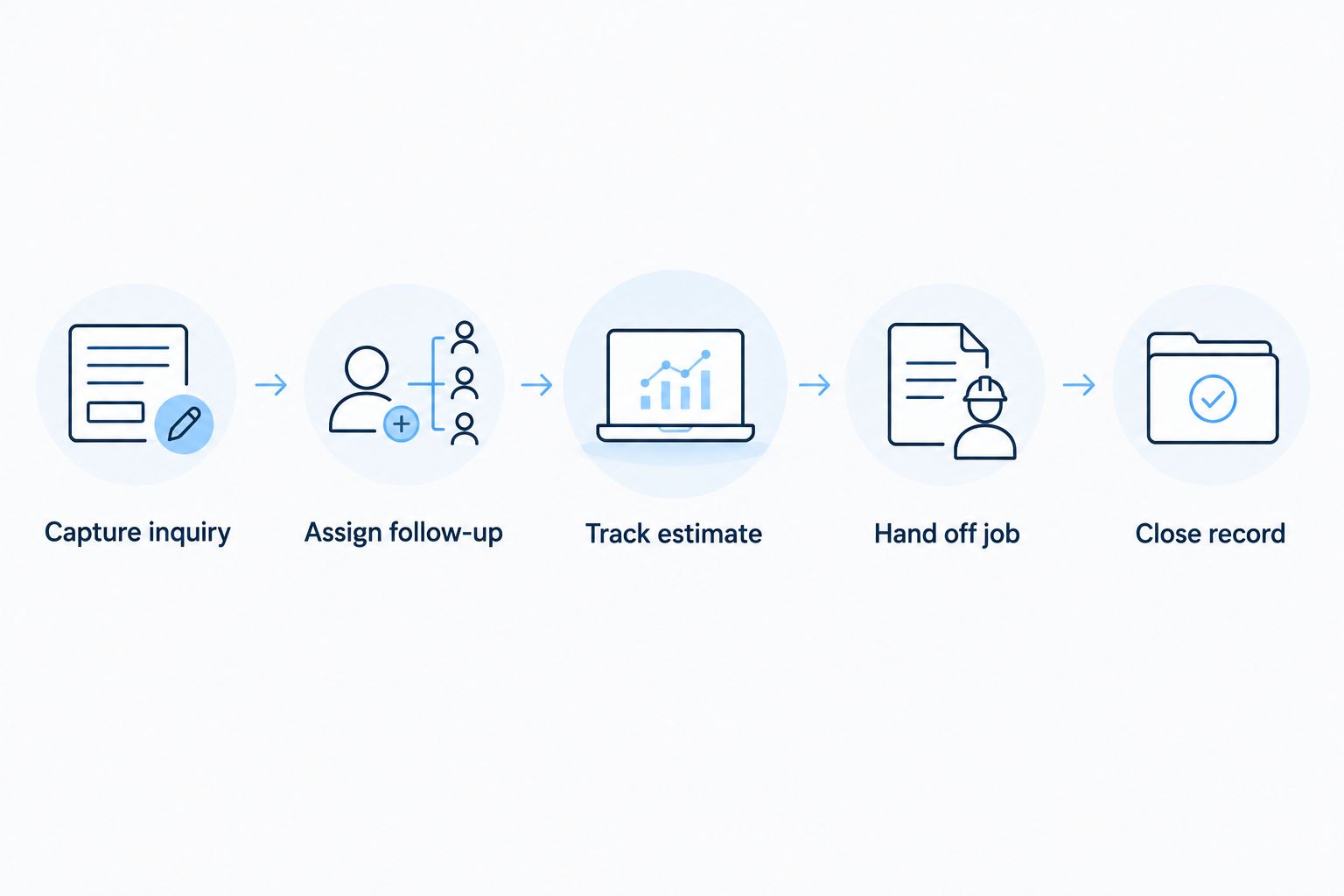
Use the same sequence in every product:
- Capture inquiry: Record the customer's contact details, property address, requested work, and preferred contact method.
- Assign follow-up: Give the inquiry a responsible person and a clear next action. Check what happens if that person is unavailable.
- Track estimate: Record whether an estimate is being prepared, has been sent, or needs a customer decision.
- Hand off job: Move an accepted estimate into your booking process without losing the agreed scope.
- Close record: Mark the outcome and remove any follow-up that no longer makes sense.
Set aside a 15-minute review at the end of each pilot day. Ask whether you can identify every open inquiry, its owner, and its next action without opening a separate personal notebook.
For your 2026 decision, keep a short pass-or-fail record. If the office can find the estimate but the technician cannot find the agreed work, the handoff fails. If a customer declines but follow-up continues, the closeout fails. Fix the process or reject the setup before importing more records.
How these CRM options are ranked
The ranking prioritizes the stated problem: keeping garage door inquiries moving toward a clear decision. Lead capture and follow-up come first, followed by estimate visibility, field handoff, usability, and fit with existing tools.
This is a workflow-fit ranking, not a claim that every configuration has been tested side by side. Product scope determines the use-case labels. Your pilot determines whether a particular setup meets your requirements.
Do not turn the table into a feature-count contest. A feature you will not use does not fix an inquiry nobody owns.
Which garage door CRM should you choose?
Choose Pufflyai when lead capture, follow-up, and pipeline management are the main problems. That is the default recommendation for a business that already has a workable way to schedule and complete jobs.
Choose Jobber when routine service scheduling anchors the purchase. Choose Housecall Pro when dispatch drives the decision. Put ServiceTitan on the shortlist when booking, dispatch, and reporting require a wider operational evaluation. Choose HubSpot CRM when opportunity tracking is the priority and you have a separate plan for field work.
Your 2026 choice should make the next action easier to see. If nobody can explain what happens after an estimate is sent, keep evaluating.
FAQ
What's the best CRM for a garage door company that loses track of leads?
A lead-focused CRM is the best fit when inquiries and follow-ups are the main problem. Choose a system that makes the customer, responsible person, current status, and next action easy to find.
Do garage door companies need a CRM or field service software?
Garage door companies need a CRM for customer and opportunity tracking, and field service software for organizing booked work. Whether you need one system or separate tools depends on which parts of your current process need replacing.
Is Jobber or Housecall Pro better for garage door work?
Choose between Jobber and Housecall Pro by testing your own booking, dispatch, estimate, and invoicing workflow. Both belong on a field service shortlist; neither should win solely because its feature list is longer.
Can HubSpot CRM manage garage door installation estimates?
HubSpot CRM can track installation opportunities through contacts and deal stages. Confirm your requirements for preparing estimates, collecting customer decisions, and handing accepted work to your scheduling process separately.
What should I ask during a garage door CRM demo?
Ask the vendor to follow one inquiry from the first contact through estimate follow-up and job handoff. Also ask what happens when the customer declines, the responsible employee is absent, or the appointment changes.
How should I compare CRM costs without choosing on price alone?
Compare current vendor terms against the specific capabilities and implementation work your business requires. Check user requirements, messaging arrangements, data migration, and any separate tools you must retain before deciding.
Should I move all my customer records into a new CRM immediately?
No. First test a small set of sample inquiries and confirm that ownership, follow-ups, estimate status, and job handoffs work as intended. Move live records only after you have a clear process for checking the transfer.
One last thing
Include a declined estimate in your test. A CRM should help you stop the wrong follow-up, not just remember the next one. Ask the office to close that opportunity, preserve the relevant history, and confirm that nobody still has a task to chase the customer.
That small check tells you whether the system reflects the customer's actual decision—or just keeps a list of names.