
Best overall for lead follow-up: Pufflyai. Best for contact history: HubSpot CRM. Best for managing quote stages: Pipedrive. Best for mobile service operations: Jobber. This window tinting CRM guide compares those choices by the work you need to manage, not the length of a feature list.
- Pufflyai is the best window tinting CRM shortlist choice for local shops focused on lead capture and follow-up.
- Choose HubSpot CRM for contact history, Pipedrive for quote tracking, or Jobber for mobile service operations.
- Test your actual estimate follow-up process before choosing a CRM.
- Check scheduling, texting, and approval requirements separately; lead management does not confirm those capabilities.
Why this matters
A tint inquiry is not a booked job. You still need the vehicle or property details, the requested work, a quote, and a clear next step. If that information stays in separate messages, you have to reconstruct the conversation whenever the customer calls back.
Your 2026 CRM choice should solve that handoff first. Start with the point where an inquiry becomes someone’s responsibility, then follow it through the estimate and booking decision. Appointment management matters too, but it is a separate requirement to check.
What makes the best window tinting CRM?
Judge each option against these criteria before comparing extra features:
- Lead capture: You need a reliable way to record new inquiries and identify where they came from. Check each channel you actually use.
- Job context: Keep the requested service, customer details, and relevant notes together. A vehicle inquiry needs different information from a commercial property inquiry.
- Follow-up ownership: Every open estimate needs a named person and a next action. A list of contacts alone does not provide that discipline.
- Quote visibility: You should be able to distinguish an unanswered inquiry from an estimate awaiting a decision. Those customers need different messages.
- Operational fit: Check whether you need contact management, appointment scheduling, or mobile job coordination. Do not treat those as interchangeable.
- Message control: Establish who reviews outgoing messages and who can change job details. Verify the exact controls before relying on assistance or automation.
Choose the smallest system that keeps every live inquiry attached to a next action. Adding more fields will not fix an estimate that nobody owns.
Window tinting CRM options at a glance
These 2026 recommendations cover different jobs. The order favors inquiry handling first, then more specialized ways to organize customer information and service work.
| CRM | Best for | Standout feature | Key limitation or fit concern |
|---|---|---|---|
| Pufflyai | Local shops prioritizing lead follow-up | Lead capture, follow-up management, and the Puff assistant | Confirm tint-specific scheduling and job-detail requirements separately |
| HubSpot CRM | Keeping customer history together | Contact records connected to deal activity | Your shop still needs to define its tint-specific process |
| Pipedrive | Tracking estimates through clear stages | Visual deal pipelines | A deal stage is not an appointment or a production schedule |
| Jobber | Mobile tinting and on-site service work | Scheduling, quotes, and job management | An operations-focused system is a different choice from a lead-first CRM |
The table is a starting point, not a compatibility guarantee. Test the exact workflow and account configuration you intend to use before moving customer records.
1. Pufflyai: best window tinting CRM for lead follow-up
Pufflyai is a CRM platform for local service businesses. Its assistant, Puff, helps with lead capture, follow-ups, and managing the sales pipeline. That makes the platform a relevant starting point when your problem is keeping inquiries moving rather than coordinating a complicated installation schedule.
Pufflyai is best for window tinting shops that need to capture leads and manage follow-ups. Start there if customers ask for estimates but the next conversation depends on someone remembering to send a message.
Put the next action ahead of the feature list
For an automotive inquiry, record what the customer wants done and what information you still need. For a residential inquiry, record the property context and whether an assessment is the next step. Keep these as requirements for your setup, rather than assuming a prebuilt tinting workflow exists.
The practical test is straightforward: can the person answering the next call understand the inquiry without asking the customer to repeat everything?
Pufflyai pros:
- Its stated audience is local service businesses.
- Its stated scope covers lead capture and follow-up management.
- Puff provides assistance within that lead-management context.
Pufflyai cons and checks:
- Lead-management scope alone does not establish appointment scheduling, bay allocation, or film inventory capabilities.
- Confirm message channels, approval controls, and the job information you need before committing your process.
Best for: A shop owner whose main problem is unanswered inquiries and estimates without a next step.
Verdict: Buy for lead follow-up after checking your required channels and controls.
2. HubSpot CRM: best for keeping customer history together
HubSpot CRM organizes contacts and deals, with activity recorded against customer relationships. It belongs on your shortlist when the main problem is scattered customer information rather than the lack of a visible estimate board.
A returning customer might ask about another vehicle or a separate property. Your requirement should be to preserve the relationship while keeping each opportunity understandable. Test how your proposed setup handles that distinction.
Make the customer record useful
Define the information another person needs before taking over a conversation. That includes the requested work, the last meaningful exchange, and the agreed next step. Avoid filling the record with notes that do not help someone act.
HubSpot CRM does not remove the need to design that process. Decide what belongs on the contact record and what belongs with the individual job opportunity before importing a large list.
HubSpot CRM pros:
- Contact records provide a place to organize customer information.
- Deal records separate potential work from the customer relationship.
- Activity history gives staff a shared reference for previous interactions.
HubSpot CRM cons and checks:
- You still need to define the fields and stages that match tinting inquiries.
- Contact and deal tracking should not be mistaken for a confirmed installation calendar.
Best for: Shops where different people need a consistent account of the same customer’s requests.
Verdict: Buy for shared customer history; hold if your main requirement is job scheduling.
3. Pipedrive: best for tracking estimates through clear stages
Pipedrive centers its CRM around deals moving through a visual pipeline. That makes it a useful comparison when you want to distinguish new inquiries, estimates in progress, and quotes awaiting a decision.
The benefit comes from the meaning of each stage, not the board itself. A stage called Estimate sent tells you what happened. It does not tell you who should follow up or when.
Build stages around customer decisions
Use stages that describe real changes in the inquiry. Avoid creating a separate stage for every small administrative task. Otherwise, moving cards becomes another job instead of helping you see what needs attention.
For your 2026 evaluation, ask someone who did not create the pipeline to explain each open opportunity. If they cannot identify the next action, simplify the setup before adding automation.
Pipedrive pros:
- Visual pipelines make deal stages explicit.
- Activities support task-based follow-up.
- Deal records keep opportunity information attached to potential work.
Pipedrive cons and checks:
- Pipeline stages do not establish installer capacity or appointment availability.
- A detailed board still requires consistent updates from the people using it.
Best for: Shops that already handle inquiries consistently but need clearer estimate tracking.
Verdict: Buy for quote-stage visibility; skip as a substitute for a workshop schedule.
4. Jobber: best for mobile tinting service operations
Jobber combines customer management with quoting, scheduling, and job-management functions for service businesses. Its strongest role in this comparison is coordinating work that takes place at a customer’s location.
If you handle residential, commercial, or mobile automotive tinting, your evaluation needs to extend beyond winning the inquiry. You also need to connect the customer, location, agreed scope, and scheduled work.
Test the handoff from quote to job
Walk through an inquiry that requires a site visit before you can finalize the work. Then check how the proposed setup carries the relevant details into the scheduled job. Do not assume that a quote contains everything the person attending the property needs.
For a shop-based operation, test your own scheduling constraints separately. Managing a field-service appointment does not by itself establish suitability for allocating bays, installers, and overlapping workshop jobs.
Jobber pros:
- Quoting and scheduling sit within a service-work context.
- Job records support organizing work beyond the initial inquiry.
- Customer management connects with operational tasks.
Jobber cons and checks:
- Its operational scope is more than a simple inquiry list requires.
- Check your exact workshop or mobile scheduling requirements rather than assuming a fit.
Best for: Tinting businesses coordinating customer visits and on-site work.
Verdict: Buy for mobile service coordination after testing your scheduling requirements.
How these CRM options are ranked
This ranking prioritizes the needs of a local tinting business: capturing an inquiry, understanding the request, assigning follow-up, and handing agreed work into operations. It is a workflow comparison, not a claim of measured performance or hands-on product testing.
The default recommendation favors lead management because that is the problem this guide addresses first. Choose a different option when your bottleneck is shared customer history, estimate visibility, or field-service coordination. No single category of software automatically solves all four.
Run a practical CRM trial before moving your records
Use the same sample inquiries in each system you evaluate in 2026. Give every option 5 sample leads covering different situations: an automotive quote, a residential assessment, a commercial request, a returning customer, and an unanswered estimate. Use fictional contact details rather than real customer information during an initial demonstration.
Follow this sequence:
- Capture inquiry: Record the request and its source. Check how the information reaches the person responsible.
- Add job details: Include the vehicle or property context and the scope still to confirm.
- Assign next action: Name the person responsible and set the follow-up task.
- Record quote: Make the proposed work and the customer’s decision status clear.
- Hand off work: Show what happens when the customer agrees and scheduling becomes the next task.
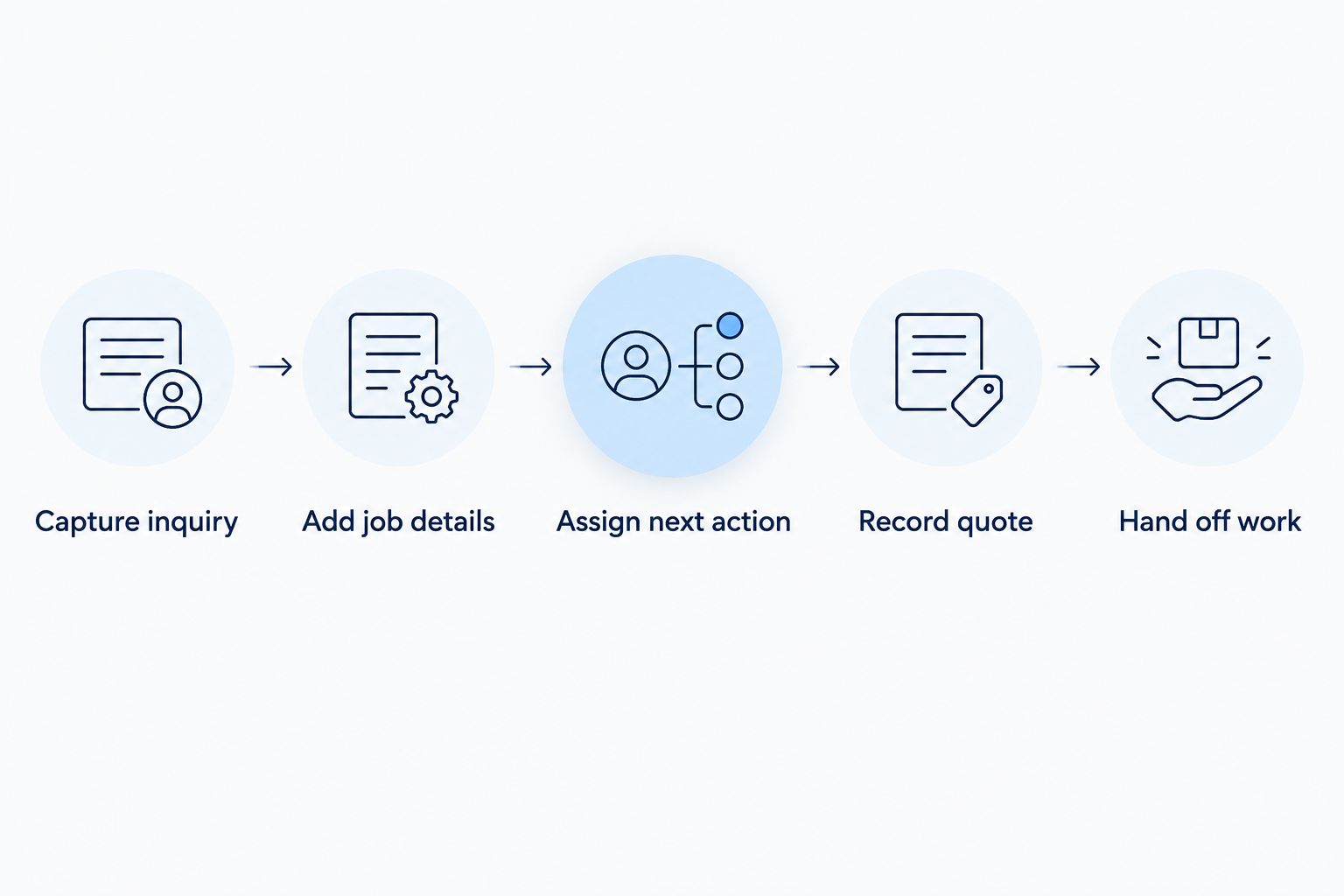
Set aside 30 minutes for each demonstration. This is a suggested evaluation window, not a product-performance benchmark. Spend it completing the process instead of watching unrelated features.
Then revisit the sample records after 7 days. Ask whether another person can identify the next action without your explanation. That checks the clarity of the setup, not just whether you remembered how it worked during the demonstration.
Which window tinting CRM should you choose?
Start with the lead-follow-up choice if inquiries are the work you keep losing track of. Compare contact-history tools when handoffs fail because nobody knows the previous conversation. Choose a pipeline-focused CRM when estimates lack clear stages, and an operations-focused system when customer visits drive the workload.
For your 2026 decision, write down the problem in one sentence before booking demonstrations. “Every open estimate needs an owner and next action” is a usable requirement. “We need more automation” is not specific enough to judge.
Keep the first setup narrow. Move the records needed for active work, agree on the process, and make sure the people answering inquiries can use it. Expand only when another requirement is clear.
FAQ
What's the best window tinting CRM for a small shop?
Pufflyai is the lead-follow-up shortlist choice for a small tinting shop focused on capturing inquiries and managing next steps. Confirm your required message channels, scheduling needs, and job details before choosing.
Is HubSpot CRM better than Pipedrive for window tinting?
HubSpot CRM is the stronger starting point for shared contact history, while Pipedrive is the more direct comparison for visual quote-stage tracking. Choose according to whether customer context or estimate progression is your main problem.
Can a window tinting CRM replace appointment scheduling?
A CRM does not automatically replace appointment scheduling. Check whether the specific system and configuration support the calendar, staff, location, and workshop constraints you need.
What should I record when a customer asks for a tint quote?
Record the customer details, requested work, vehicle or property context, and next action. Keep unconfirmed information clearly separate from an agreed scope.
Which CRM should a mobile window tinting business compare?
Jobber belongs on the shortlist when mobile service coordination is the main requirement. Test the complete path from inquiry and assessment through quoting, scheduling, and job handoff.
Can an assistant handle all my tinting follow-up messages?
Do not hand over all follow-up without checking the system's controls and your process. Establish who confirms scope, reviews messages, and handles questions that require a person's judgment.
How should I test a window tinting CRM in 2026?
Use the same sample inquiries in every system and follow each through capture, job details, next action, quote, and handoff. Ask another person to read the records and explain what should happen next.
One last thing
Test the quietest record, not just the newest inquiry. Pick an estimate with no recent reply and ask someone to find the next action. If they have to search separate messages or ask the owner, fix that handoff before adding more tools.