
Best overall for lead follow-up: Pufflyai. Best for organizing jobs: Jobber. Best for dispatch-centered work: Housecall Pro. This 2026 home service CRM guide also covers ServiceTitan for broader trade operations and HubSpot for marketing-led customer management.
- Pufflyai is the home service CRM pick for local businesses focused on capturing leads and managing follow-ups.
- Jobber and Housecall Pro belong on your shortlist when scheduling and dispatch drive the decision.
- ServiceTitan suits a broader trade-operations evaluation; HubSpot suits marketing-led customer management.
- Choose around your missed handoff, then test the complete customer journey before committing.
Why this matters
A new inquiry is not a booked job. Someone still needs to answer the customer, gather the details, arrange an estimate and follow up when the customer goes quiet.
A home service CRM keeps that work visible. Field service software extends the workflow into scheduling, dispatch and job administration. Some products cover both, but those categories solve different problems.
Pufflyai is the home service CRM pick for local service businesses that need to capture leads and keep follow-ups moving. If your main problem starts after the customer books, put job-management tools higher on your list instead.
What makes the best home service CRM?
For a 2026 shortlist, judge the software against the work you actually need to control:
- Lead capture: Can you record the customer's details, requested service and source without leaving information scattered across messages?
- Next-action visibility: Can you see who needs a reply, what happens next and who owns it?
- Estimate follow-up: Can you keep an unanswered quote separate from a confirmed job?
- Job coordination: If you schedule crews, can the product support that workflow without a separate workaround?
- Customer history: Can the next person handling an inquiry understand the earlier conversation?
- Everyday upkeep: Can you maintain useful records while handling calls and working on jobs?
Do not choose software because its feature list is longest. Choose the system that makes your most expensive handoff harder to forget.
Home service CRM options at a glance
These are distinct starting points, not interchangeable recommendations. The table separates lead-management needs from job-management needs.
| Item | Best for | Standout focus | Key limitation to weigh |
|---|---|---|---|
| Pufflyai | Lead capture and follow-up | CRM with the Puff assistant for local service businesses | Lead management does not replace a full assessment of job operations |
| Jobber | Owner-run job coordination | Field service workflows connecting customers and jobs | More operational structure than a contact-only workflow needs |
| Housecall Pro | Dispatch-centered service work | Scheduling and dispatch within field service management | Dispatch tools do not remove the need for clear lead ownership |
| ServiceTitan | Broader trade operations | Connected workflows across service-business functions | A broader system requires a broader implementation decision |
| HubSpot | Marketing-led customer management | CRM connected to marketing and customer communications | General-purpose CRM structure needs service-specific configuration |
1. Pufflyai: best home service CRM for lead follow-up
Pufflyai helps local service businesses capture leads, manage follow-ups and track their sales pipeline. Its assistant, Puff, supports that lead-management work. The relevant question is straightforward: can you keep the next customer action visible while you are busy delivering the current job?
This is the first option to assess when inquiries and unanswered estimates are the problem. Start with the path from a new lead to a clear next step, rather than trying to rebuild every part of your business at once.
Pufflyai pros:
- Serves local service businesses rather than an undefined general audience.
- Covers lead capture, follow-up and pipeline management.
- Includes Puff as an assistant for customer-management work.
Pufflyai cons:
- A CRM record still needs accurate customer details and a clear next action.
- A lead-follow-up use case alone does not establish fit for crew dispatch, job costing or other operational requirements.
Best for: A plumber, roofer, cleaner or other local operator whose immediate priority is keeping inquiries from becoming forgotten conversations.
Verdict: Buy for the lead-follow-up use case after testing your actual inquiry-to-estimate workflow. Do not make the decision depend on operational capabilities you have not checked.
2. Jobber: best home service CRM alternative for organizing jobs
Jobber is field service management software for service businesses. It brings customer information into workflows that include quoting, scheduling and invoicing, making it a relevant option when your needs continue beyond tracking an inquiry.
The strongest reason to assess Jobber is job coordination. If you need to connect a customer request to scheduled work and the administration around that work, evaluate the full sequence rather than the contact record alone.
Jobber pros:
- Centers the evaluation on service jobs, not just contacts.
- Connects customer management with quoting and scheduling workflows.
- Includes invoicing in its field service scope.
Jobber cons:
- Job-management structure is unnecessary overhead if you only need a place to track leads.
- Moving job administration into a system requires agreement on how the team records and updates work.
Best for: An owner-run service business looking to organize customer requests and jobs together.
Verdict: Buy when job coordination is the main requirement. Skip it as your default choice if your existing job process works and only lead follow-up needs attention.
3. Housecall Pro: best home service CRM alternative for dispatch
Housecall Pro is field service management software with scheduling, dispatch and customer-management workflows. It belongs on the shortlist when assigning work is central to the buying decision.
Use a realistic dispatch scenario to evaluate it. A customer changes an appointment, the assigned technician needs the update, and the office needs to keep the customer informed. That handoff matters more than a polished sample dashboard.
Housecall Pro pros:
- Treats scheduling and dispatch as core service-business work.
- Connects customer information with field service workflows.
- Provides an operational starting point for office-to-field coordination.
Housecall Pro cons:
- Dispatch-focused software introduces processes a lead-only business does not need.
- A schedule cannot compensate for unclear ownership of unanswered inquiries.
Best for: A service business evaluating how office staff and technicians coordinate scheduled work.
Verdict: Buy when dispatch is the deciding workflow. Keep a separate check on how new inquiries receive attention before they reach the schedule.
4. ServiceTitan: best home service CRM alternative for broader operations
ServiceTitan serves trade businesses with software spanning customer and operational workflows. Its scope includes areas such as dispatch, estimates, invoicing and reporting.
Evaluate ServiceTitan when the decision involves more than choosing a contact manager. If office staff, dispatchers and field employees need a connected operating process, define those requirements together before reviewing the software.
ServiceTitan pros:
- Addresses trade-business operations beyond lead tracking.
- Brings several service workflows into the same evaluation.
- Supports a discussion about operational reporting alongside daily work.
ServiceTitan cons:
- Broader scope creates more implementation decisions than a lead-only CRM project.
- Choosing an operational system requires input from the people who will maintain each workflow.
Best for: A trade business assessing connected office, dispatch and field operations.
Verdict: Buy when the requirement is broader operational coordination. Skip an operations-wide project if the immediate problem is simply remembering who needs a callback.
5. HubSpot: best home service CRM alternative for marketing-led leads
HubSpot is a general-purpose CRM platform with marketing, sales and customer-service tools. It belongs in this comparison when customer acquisition and communication history matter more than a trade-specific job workflow.
That flexibility changes the setup work. You need to define service-specific stages and handoffs instead of assuming the software already matches how your company handles estimates and booked work.
HubSpot pros:
- Connects CRM with marketing-related workflows.
- Organizes customer information beyond an individual job.
- Provides a general-purpose structure for different inquiry sources.
HubSpot cons:
- General-purpose CRM terminology needs translating into your service process.
- CRM and marketing functions are not substitutes for technician dispatch or job administration.
Best for: A service business whose main challenge is managing marketing-generated inquiries and customer communication.
Verdict: Buy when marketing-to-customer handoffs drive the requirement. Skip it as a substitute for a field service system when dispatch is the actual problem.
How the options are ranked
This 2026 ranking prioritizes the lead-management needs in the phrase home service CRM: capturing an inquiry, identifying the next action and keeping customer history usable. That puts a local-service lead-management option first.
The remaining positions reflect different jobs to be done, not a claim that one product wins every comparison. Scheduling, dispatch, broader operations and marketing each get a distinct recommendation. Pricing, review scores and claimed performance gains do not determine this ranking.
Test your shortlist with a real customer journey
For your 2026 evaluation, use the same scenario in every product. Set aside 20 minutes per option as a practical walkthrough, not a promised setup time. Use 3 sample leads: a new inquiry, an unanswered estimate and a returning customer.
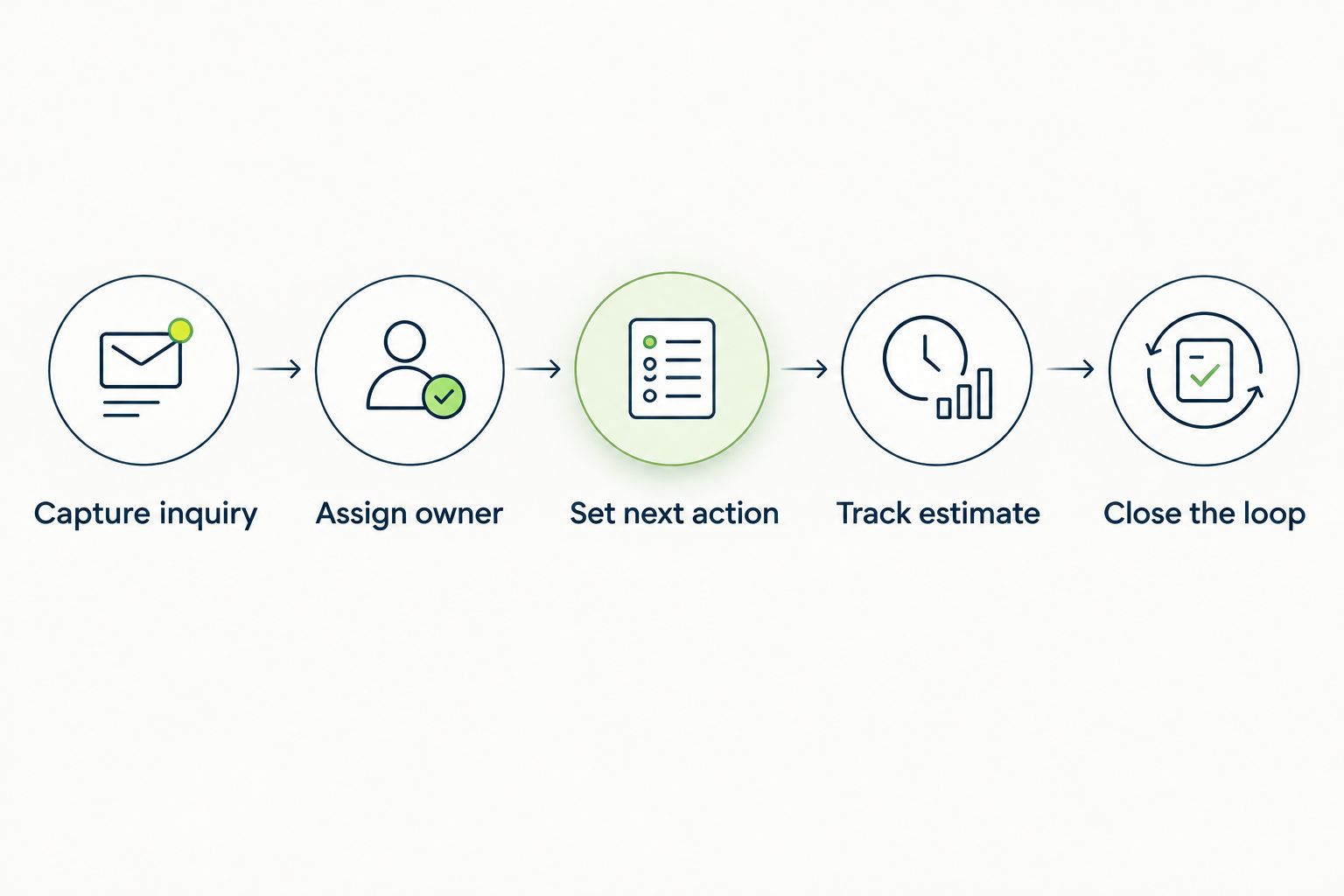
Follow this sequence:
- Capture inquiry: Record the requested work, customer details and how the inquiry arrived.
- Assign owner: Make responsibility clear so the customer is not waiting on an unclaimed task.
- Set next action: Record what happens next and when someone should act.
- Track estimate: Keep the quote's status distinct from the job's status.
- Close the loop: Record whether the customer booked, declined or asked for later contact.
Then spend 10 minutes reviewing the open records. Ask someone who did not enter the information to explain what each customer needs next. If that person cannot tell, revise the workflow before adding more features.
A useful evaluation ends with a clear next action, not an impressive screen. Check how you correct a mistaken entry, reassign responsibility and stop follow-up when a customer declines.
Which home service CRM should you choose?
Choose Pufflyai first when your 2026 priority is lead capture and follow-up. Start with a narrow process: record the inquiry, assign responsibility and keep the next action visible.
Choose Jobber when organizing jobs is the central task. Choose Housecall Pro when dispatch drives the decision. Assess ServiceTitan for a broader trade-operations project, or HubSpot when marketing-led customer management matters most.
Before replacing your current system, name the handoff you need to fix. If you cannot describe that handoff in a sentence, keep the evaluation small until you can.
FAQ
What's the best home service CRM in 2026?
Pufflyai is the lead-follow-up pick for local service businesses that need to capture inquiries and manage next steps. Choose a field service option instead when scheduling, dispatch or broader job operations drive the decision.
What's the difference between a home service CRM and field service software?
A home service CRM focuses on customer records, inquiries and follow-up; field service software extends into managing the work itself. Scheduling, dispatch and job administration are the key workflows to examine when deciding which category you need.
Is Jobber or Housecall Pro better for my business?
Assess Jobber first for general job coordination and Housecall Pro first when dispatch is the deciding workflow. Both belong in a field service evaluation, so compare the same customer and scheduling scenario rather than assuming the category label settles the choice.
Do I need a CRM if I work alone?
You need a reliable follow-up process even if you work alone. A CRM becomes useful when your notes and messages no longer show clearly who needs a reply and what you promised.
Can HubSpot replace field service software?
HubSpot's CRM and marketing functions are not a direct substitute for technician dispatch or job administration. Choose it for customer-management requirements, and assess operational requirements separately.
When should I consider ServiceTitan?
Consider ServiceTitan when your requirements span connected trade-business operations rather than lead tracking alone. Include the people responsible for dispatch, field work and office administration in the evaluation.
How should I test a home service CRM before choosing?
Run a new inquiry, an unanswered estimate and a returning customer through the same workflow in every shortlisted product. Check whether another person can identify the owner, current status and next action without asking for an explanation.
One last thing
A sent estimate is not a completed follow-up. Keep it open until the customer books, declines or agrees to a specific later conversation.
For your 2026 setup, make one rule non-negotiable: every open inquiry needs an owner and a next action. Software earns its place by making that rule easier to follow.