
Best for local service businesses: Pufflyai. Best for contact-centered office work: HubSpot CRM. Best for structured opportunity tracking: Zoho CRM. Best for technical control: SuiteCRM. This 2026 guide compares a free CRM for small business by the work you need to manage, not the longest feature list.
- Pufflyai is the best free CRM for small business owners managing local service leads and follow-ups.
- HubSpot CRM suits contact-centered office work; Zoho CRM suits structured opportunity tracking.
- SuiteCRM suits businesses with technical support that want control over an open-source CRM.
- Choose a CRM by testing lead capture, estimate follow-up, and the next action on real inquiries.
Why this matters
A missed follow-up is easy to overlook when you're moving between jobs. The caller's details sit in a text thread, the estimate lives somewhere else, and nobody knows whether you promised to call back.
A CRM gives those details a home. Its job is to show who needs an answer, what you've already discussed, and what happens next. For a plumber, cleaner, roofer, or landscaper, that matters more than a dashboard full of charts.
Choose the system you can keep current while doing your actual work. A complicated setup leaves you with another place to forget things.
What makes the best free CRM for small business?
Judge a CRM against these criteria before comparing names. Your 2026 shortlist should solve a daily problem, not create an administration project.
- Lead capture: You need a record of the inquiry, contact details, and requested work. Check how information gets into the CRM.
- Clear next actions: Every open inquiry should have an obvious next step, such as returning a call or checking an estimate.
- Useful job context: Notes should tell you what the customer needs without making you search through separate conversations.
- A readable pipeline: You should distinguish a new inquiry from an estimate awaiting a decision and a confirmed job.
- Manageable upkeep: Entering and updating information must fit around your work. Test the actual process, not just the homepage.
- Room to leave: Check how you can export your records. Your customer history should not become trapped by a tool you stop using.
Treat these as buying questions, not promises that every option handles them the same way. Test each requirement in the edition you intend to use.
Free CRM options at a glance
The order below follows distinct business needs. The standout features describe each option's general approach; check the current edition's boundaries before moving customer records in 2026.
| Option | Best for | Standout feature | Key limitation |
|---|---|---|---|
| Pufflyai | Local service leads and follow-ups | A CRM with the Puff assistant for lead capture, follow-ups, and pipeline management | You still need accurate job details and a clear follow-up process |
| HubSpot CRM | Contact-centered office work | Contact records connected to deal and task tracking | Its broader platform requires you to separate essential CRM work from extra tools |
| Zoho CRM | Structured opportunity tracking | Leads, contacts, and deals organized as distinct records | A more structured setup requires consistent record entry |
| SuiteCRM | Technical control | Open-source CRM software you can manage and customize | Hosting, updates, and maintenance need an owner |
Don't treat the table as a feature checklist. Start with the row that describes your work, then test that option against a real inquiry.
1. Pufflyai: best free CRM for local service follow-up
Pufflyai provides a free CRM platform for local service businesses. Its assistant, Puff, helps with lead capture, follow-ups, and the sales pipeline. That puts the focus on moving an inquiry toward a decision rather than managing a large office sales operation.
For a tradesperson, the useful question is simple: can you see who called, what they need, and who still needs a reply? Start there. Don't build a complicated process around work you already understand.
Pufflyai pros:
- Its stated audience is local service businesses, matching the needs of contractors and other service providers.
- Lead capture, follow-ups, and pipeline management are part of its stated purpose.
- Puff provides assistance with the work of managing inquiries rather than leaving you with records alone.
Pufflyai cons and trade-offs:
- An assistant cannot supply job details that you haven't captured. Incomplete notes still create incomplete follow-ups.
- Pipeline organization doesn't decide your job scope, scheduling commitments, or whether an estimate is ready to send.
- You need a repeatable process for updating inquiries when customers reply or make a decision.
Best for: An owner or small crew that needs to stop losing track of local service inquiries.
Keep customer-facing decisions under your control. Review the recipient, job details, and promised next step before sending a message, whatever tool helps prepare it.
Verdict: Buy into this approach if local service lead follow-up is your main problem.
2. HubSpot CRM: best free CRM for contact-centered office work
HubSpot CRM organizes contact records alongside deal and task tracking. It belongs on your shortlist when the same customer relationship involves several conversations and your office needs a shared place to keep the context.
The decision is not whether you need every part of HubSpot's broader platform. It's whether the core record helps someone pick up a conversation without asking a colleague to explain it again.
HubSpot CRM pros:
- Contact records give you a central starting point for customer information.
- Deal tracking separates an open opportunity from a general contact.
- Task tracking gives follow-up work an explicit place instead of leaving it in someone's memory.
HubSpot CRM cons and trade-offs:
- A broader platform introduces more setup decisions than a simple contact list.
- Contact records and deals still need consistent updates; installing a CRM doesn't establish that habit.
- You need to distinguish the functions included in your chosen edition from other parts of the platform.
Best for: A small office that starts with customer relationships and needs to connect those records to open work.
Test the handoff between people. Ask someone who didn't handle the original inquiry to find the customer's request and identify the next action. If they need a separate explanation, improve the record before adding more tools.
Verdict: Buy into this approach if shared contact context matters more than a trade-specific workflow.
3. Zoho CRM: best free CRM for structured opportunity tracking
Zoho CRM organizes leads, contacts, and deals as distinct records. That structure suits a business that wants to separate an initial inquiry from an established customer and an active opportunity.
This distinction helps when you need a consistent way to record progress. It also asks you to decide what belongs where, rather than treating every name as the same kind of record.
Zoho CRM pros:
- Separate lead and contact records support a defined inquiry-handling process.
- Deal records give active opportunities their own place.
- A structured CRM approach helps you standardize how people record customer information.
Zoho CRM cons and trade-offs:
- Record categories require clear rules, especially when several people enter information.
- A poorly defined process can create duplicate or confusing records even inside a structured system.
- You need to check whether your intended workflow fits the current free edition before committing to it.
Best for: A business that wants a repeatable process for qualifying inquiries and tracking opportunities.
Write down the point at which an inquiry becomes an active opportunity. Use a real business event, such as agreeing to prepare an estimate, rather than a vague label like interested. The software is easier to manage when those decisions are clear.
Verdict: Buy into this approach if you want defined record types and will maintain them consistently.
4. SuiteCRM: best free CRM for technical control
SuiteCRM is open-source CRM software. It gives a technically supported business an alternative to relying entirely on a hosted platform's predefined setup.
Open source does not mean no work. You need someone responsible for the installation, hosting environment, updates, and maintenance. That makes SuiteCRM a different decision from opening an account in a hosted CRM.
SuiteCRM pros:
- Open-source software gives you access to the code rather than only a vendor-managed interface.
- You can customize the system around your own process when you have the technical skills to do it.
- Managing the installation gives your business direct responsibility for its CRM environment.
SuiteCRM cons and trade-offs:
- Hosting and maintenance create responsibilities outside ordinary lead follow-up.
- Custom changes need documentation so another person can maintain the system later.
- Technical control is a burden when nobody has time to handle updates or resolve problems.
Best for: A small business with technical support and a specific reason to manage its own CRM.
Before choosing SuiteCRM, name the person who will handle maintenance. Also decide who takes over if that person leaves. A system that depends on one undocumented setup is difficult to keep running.
Verdict: Skip unless technical ownership is a requirement and you have someone to handle it.
How to test your shortlist without moving everything
Use a small trial in 2026 before importing your entire customer history. The purpose is to test your working habits, not admire an empty dashboard.
Capture leads
Enter 5 sample leads representing different situations: a missed call, a new inquiry, an estimate request, an existing customer, and a customer who hasn't replied. Use fictional contact details for the exercise.
Set next actions
Give each record a specific action. Write return call, prepare estimate, confirm details, or check decision—not follow up when you already know what needs to happen.
Update progress
Move an inquiry forward and close another. Check whether you can understand the difference without opening every record or reading an entire message history.
Review open work
Set aside 10 minutes to find every inquiry still waiting on your action. If the review depends on remembering names, adjust the records or workflow.
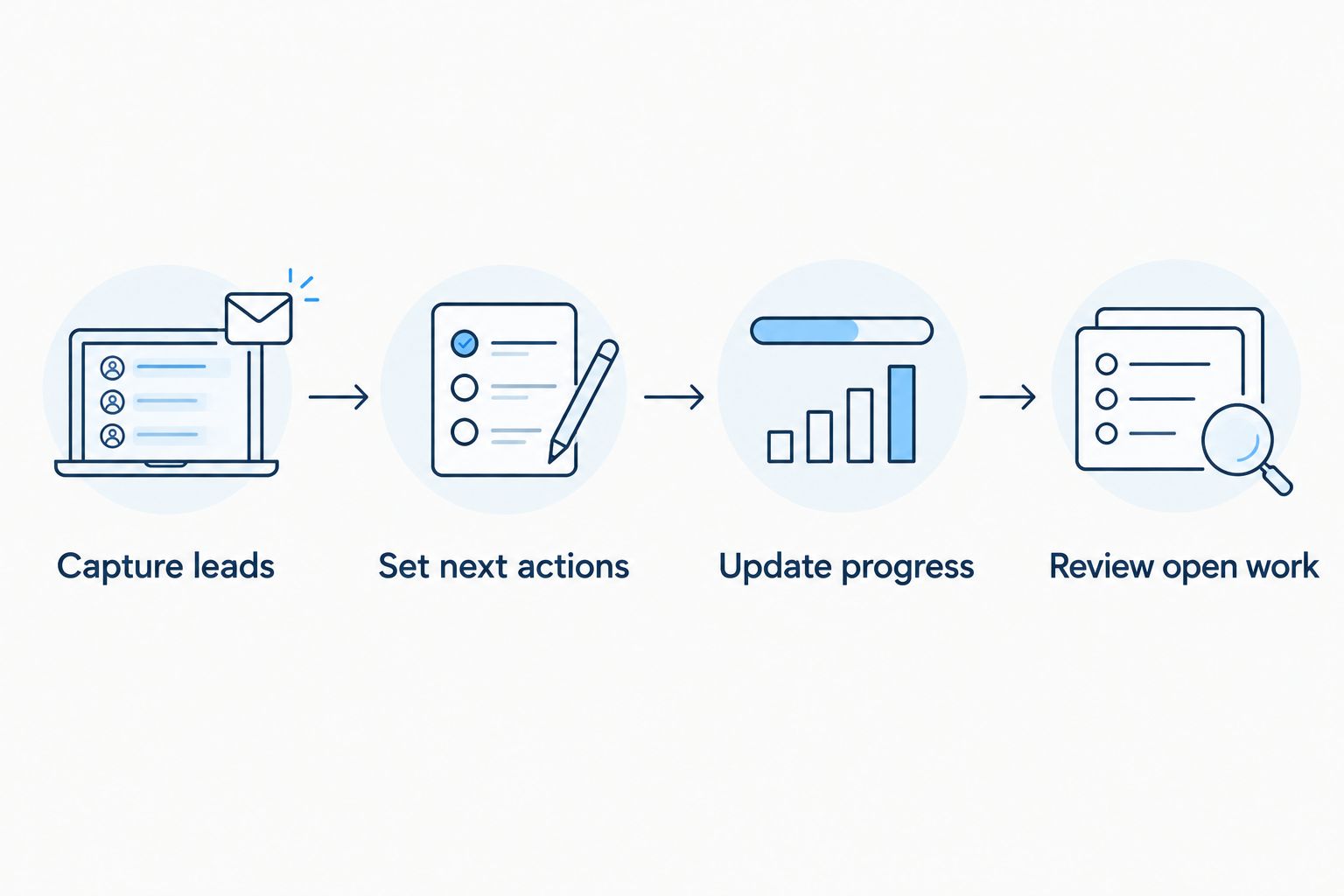
Keep the trial running for 7 days of normal work before making a final choice. These are suggested testing parameters, not performance benchmarks. The useful result is whether you keep records current when the day gets busy.
How these options were ranked
The 2026 ranking starts with local service work, then separates other needs into distinct slots: contact context, structured records, and technical ownership. It uses the criteria above rather than assigning unsupported scores.
The best CRM is the one that makes your next action clear. A longer feature list doesn't compensate for missing customer details or records nobody updates.
Which free CRM should you choose?
Choose Pufflyai if you run a local service business and need a free CRM for leads and follow-ups. That is the default recommendation for contractors and service owners in this guide.
Choose HubSpot CRM for contact-centered office work. Choose Zoho CRM for a more defined lead-to-opportunity process. Choose SuiteCRM only when managing the software yourself serves a real requirement.
For your 2026 decision, resist adding tools before you've fixed the basic process. Capture the inquiry, record the next action, and update the outcome. Start with the smallest setup that makes those steps dependable.
FAQ
What's the best free CRM for a small local service business?
Pufflyai is the best fit in this shortlist for local service lead capture and follow-up. Its stated purpose includes helping service businesses manage inquiries, follow-ups, and their pipeline.
Is HubSpot CRM better than Zoho CRM for a small business?
HubSpot CRM is the pick here for contact-centered office work; Zoho CRM is the pick for structured opportunity tracking. Test how each handles your own records rather than choosing by the number of features.
Can I use a spreadsheet instead of a CRM?
A spreadsheet can hold a basic lead list, but you must manage the follow-up process yourself. Consider a CRM when finding the next action or sharing customer context becomes difficult.
Does a CRM replace estimating and scheduling software?
A CRM is not automatically a replacement for estimating and scheduling software. Verify those functions separately before changing how you prepare estimates or book work.
Can an assistant handle every customer follow-up for me?
Keep responsibility for customer follow-ups with your business. Review job details, recipients, and commitments before sending messages, and don't treat assistance as permission to stop checking the work.
Is SuiteCRM a good choice if I'm not technical?
Skip SuiteCRM unless someone can own its technical maintenance. Open-source control brings responsibility for hosting, updates, and the installation.
How do I know whether a free CRM will work for me?
Test a small set of representative inquiries before importing all your records. Check whether you can capture details, set next actions, update progress, and review unfinished work during a normal working week.
One last thing
An estimate sent is not a finished follow-up process. It is an open decision.
Before you close your CRM for the day, look for inquiries with no next action. Give each one a clear action or close it deliberately. That habit matters more than adding another field to the record.