
Best overall for lead follow-up: Pufflyai. Best for managing quotes through scheduled jobs: Jobber. Best for recurring service workflows: Housecall Pro. Best for an office-led sales process: HubSpot CRM. This 2026 pressure washing CRM guide helps you choose around the work that slips through the cracks—not the longest feature list.
- Pufflyai is the best pressure washing CRM choice here for local operators focused on lead capture and follow-up.
- Choose Jobber when estimates, scheduling, and invoicing need to work together.
- Choose Housecall Pro when repeat service and field scheduling drive your workflow.
- Choose HubSpot CRM when office staff manage a more structured sales process.
- Test each option with real inquiries before moving your customer records.
Why this matters
A pressure washing business needs to keep two different promises: respond to the person asking for a quote, then deliver the job you book. Customer relationship management software helps with the first. Field-service software connects that customer record to estimates, schedules, and billing.
Choose the wrong starting point and you create extra work. A detailed dispatch calendar does not fix forgotten estimates. A tidy contact list does not organize tomorrow’s crews.
For your 2026 shortlist, identify the handoff that breaks most often. Start there. The best system is the one that gives each open inquiry a clear next action without interrupting the work you are doing onsite.
What makes the best pressure washing CRM?
Use these criteria before comparing names. They separate a useful daily tool from another place to store phone numbers.
- Lead capture: You need a consistent place for the customer’s details, property address, requested surfaces, and contact history.
- Follow-up ownership: Each open estimate needs a next action and someone responsible for it. A reminder without an owner leaves the same gap.
- Quote-to-job continuity: Check whether you need customer tracking alone or a connected process for estimates, scheduling, and invoices.
- Field usability: Test the tasks you actually perform between jobs. Opening a customer record matters more than admiring a dashboard.
- Repeat-service handling: Decide how you will record maintenance interest, future work, and the customer’s preferred contact method.
- Control over messages: Know what sends automatically, what requires review, and how you stop follow-up after a customer declines.
For a 2026 decision, treat these as pass-or-fail checks. Do not award points for features you cannot connect to a real task.
Pressure washing CRM options at a glance
The order below favors lead follow-up first, then broader job management, recurring work, and office-led sales. These are different use cases—not interchangeable winners.
| Option | Best for | Standout capability | Key limitation or trade-off |
|---|---|---|---|
| Pufflyai | Capturing leads and managing follow-up | Local-service CRM with the Puff assistant | Customer tracking still needs a clear handoff into job delivery |
| Jobber | Connecting estimates to scheduled jobs | Quotes, scheduling, and invoicing in a field-service workflow | More operational setup than a lead-only process requires |
| Housecall Pro | Managing recurring service workflows | Field scheduling, invoicing, and service-plan tools | Recurring work needs accurate setup and customer expectations |
| HubSpot CRM | Office-managed sales opportunities | Contact records, deal tracking, and sales activities | Sales tracking is not the same as field dispatch |
1. Pufflyai: best pressure washing CRM for lead follow-up
Pufflyai is a CRM for local service businesses that helps capture leads, manage follow-ups, and track opportunities, with an assistant called Puff. It is the strongest starting point here when the immediate problem is remembering who asked for work and what needs to happen next.
That focus fits an owner who is washing a driveway while another homeowner asks about a house wash. The useful outcome is straightforward: keep the inquiry visible, record what the customer wants, and make the next contact deliberate.
Pufflyai pros:
- Its stated purpose matches local-service lead capture and follow-up.
- Customer tracking gives you a place to organize open opportunities.
- Puff adds assistant support to the CRM workflow.
- The focus suits businesses fixing missed inquiries before redesigning job operations.
Trade-offs:
- Lead management does not replace a defined process for preparing quotes and delivering booked work.
- An assistant still needs accurate customer information and clear instructions.
- Customer records only stay useful when you update outcomes after conversations.
Best for: An owner-operator or small service business that needs control over inquiries and outstanding estimates.
Start with simple stages: New inquiry, Quote needed, Quote sent, Booked, and Closed. Those are suggested working labels, not a claim about preset software stages. Every open record should answer one question: what happens next?
Verdict: Buy for the lead-follow-up use case. Keep job-delivery requirements on a separate checklist.
2. Jobber: best pressure washing CRM for quote-to-job management
Jobber is field-service management software with customer records, quoting, scheduling, and invoicing. Choose this type of system when your problem extends beyond winning the job into organizing the work afterward.
For a pressure washing business, the decision point is the handoff. Once a customer accepts an estimate, can your office or crew find the right job details without rebuilding the record elsewhere? Test that complete journey rather than judging the contact screen alone.
Jobber pros:
- Customer records sit alongside field-service work.
- Quoting supports the step between inquiry and booking.
- Scheduling provides an operational home for accepted work.
- Invoicing connects the completed job to billing.
Jobber trade-offs:
- A connected workflow requires you to define job details and responsibilities consistently.
- Broader job management adds setup work if you only need follow-up reminders.
- Software cannot resolve unclear estimates or incomplete scope notes.
Best for: A pressure washing business that wants estimates, scheduled work, and billing organized together.
During a demonstration, use a realistic job: a driveway plus an optional patio wash. Ask how the customer’s decision becomes the final job scope. Then follow that record through scheduling and invoicing.
This exposes more than a polished sample account. You need to see whether the information stays clear when the customer changes their mind.
Verdict: Buy when the quote-to-job handoff is your main bottleneck; skip the broader setup if lead tracking is the only problem.
3. Housecall Pro: best pressure washing CRM for recurring service
Housecall Pro is field-service software with customer management, scheduling, invoicing, and service-plan tools. Its role in this shortlist is recurring service: organizing customers whose work is not a one-time transaction.
That does not mean every pressure washing customer belongs on a repeating schedule. It means you need a deliberate way to distinguish an agreed recurring service from someone who simply asked you to check back later.
Housecall Pro pros:
- Customer records connect with field scheduling.
- Invoicing supports the billing side of service work.
- Service-plan tools address ongoing customer relationships.
- The field-service focus suits businesses coordinating work beyond the initial sale.
Housecall Pro trade-offs:
- Recurring-service setup requires clear scope and customer agreement.
- Future scheduling still needs review when access, weather, or job requirements change.
- A business doing only occasional one-off work has less reason to prioritize service-plan tools.
Best for: A pressure washing business building an organized repeat-service operation.
Test with two distinct customer situations. One customer has agreed to recurring work. Another only wants a reminder to discuss a future clean. Your process should keep those commitments separate so a follow-up task does not become an assumed booking.
Before choosing, check the specific workflow you intend to use. A recurring relationship needs clear records of what was agreed, not just another date on a calendar.
Verdict: Buy when recurring service is part of your operating model; wait if repeat work is still handled case by case.
4. HubSpot CRM: best pressure washing CRM for office-led sales
HubSpot CRM organizes contacts, deals, and sales activities. It fits this list when someone in the office manages inquiries, tracks opportunities, and coordinates the next sales action.
That distinction matters for businesses pursuing property managers or commercial accounts. The sales process can involve several conversations before a job is ready to schedule. Contact and deal tracking help organize that work, but do not confuse an opportunity stage with a crew assignment.
HubSpot CRM pros:
- Contact records organize customer relationships.
- Deal tracking separates open opportunities from general contacts.
- Sales activities support a defined follow-up process.
- The structure fits office staff managing longer customer conversations.
HubSpot CRM trade-offs:
- A sales CRM is not a substitute for field-service dispatch.
- Someone needs to maintain stages, activities, and record quality.
- A detailed sales process adds unnecessary administration when the owner only needs a short callback list.
Best for: A pressure washing company with office support and a distinct sales process, especially for commercial opportunities.
Test a property-management inquiry that involves multiple locations. Check how you would record the decision-maker, the requested scope, and the next conversation. Then identify where the approved work leaves sales tracking and enters job scheduling.
If that boundary is unclear, fix the process before adding more stages.
Verdict: Buy for a defined office-led sales workflow; skip when you primarily need field scheduling or a simple owner callback process.
How these options rank
This 2026 ranking prioritizes the criteria above: lead capture, follow-up ownership, continuity into jobs, field use, repeat work, and message control. The default recommendation addresses lead follow-up; the other choices serve different operational needs.
This is a workflow-based shortlist, not a performance benchmark. The table does not rank response speed, ease of use, or customer results. Your own task test should decide the final choice.
Run a short test before committing
Set aside 20 minutes for each shortlisted system. Use 3 sample inquiries: a new driveway request, an unanswered estimate, and a past customer asking about another clean. These are recommended test conditions, not product performance claims.
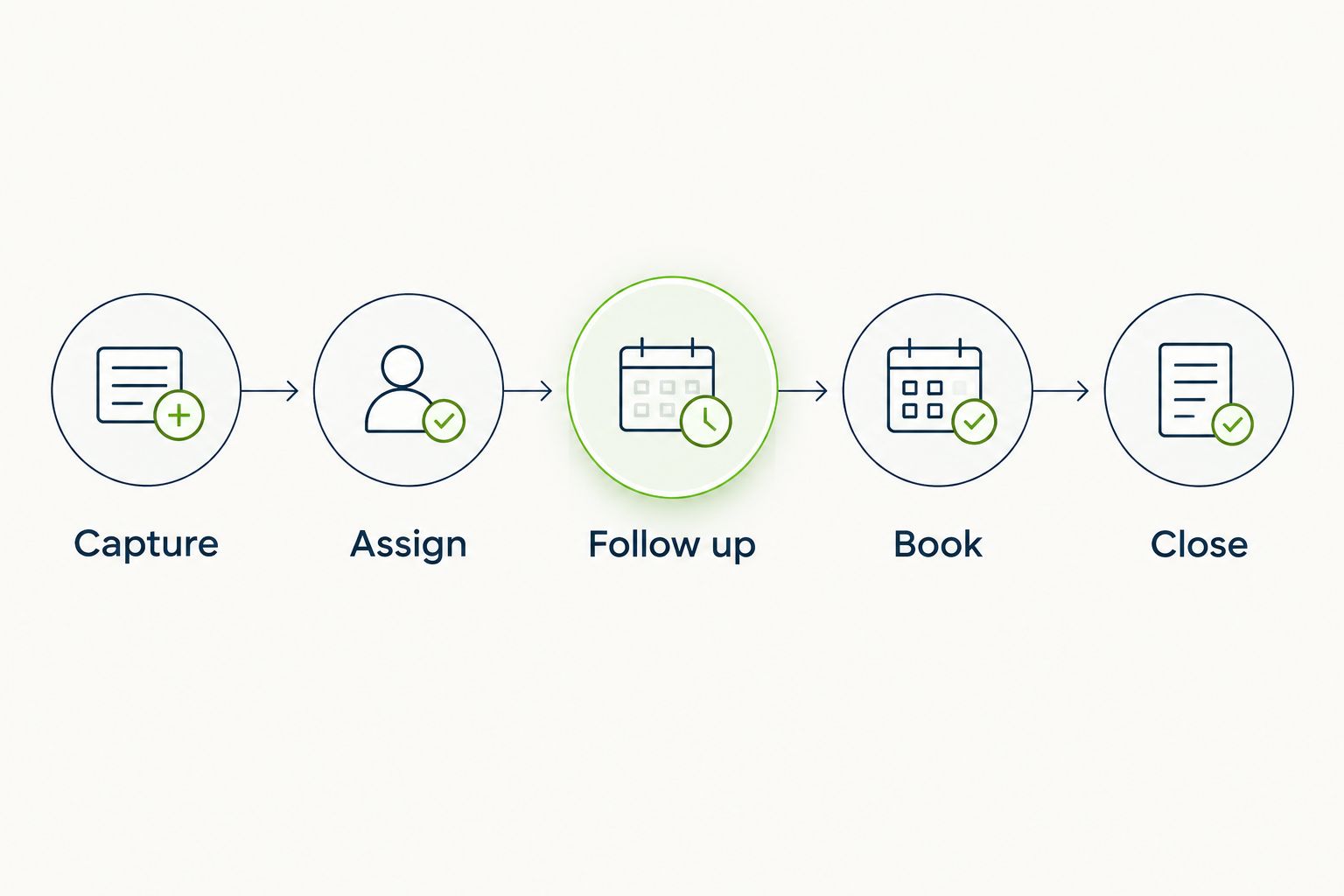
Follow the same sequence in every system:
- Capture: Record the customer, property, requested work, and contact preference.
- Assign: Give the inquiry an owner and a clear status.
- Follow up: Set the next action without assuming the customer has agreed to book.
- Book: Record the accepted scope and identify the scheduling handoff.
- Close: Mark the outcome and stop unnecessary follow-up.
Afterward, spend 5 minutes reviewing the records without opening your separate notes. Can you tell which customer needs attention and why? If not, simplify the process before importing your full customer list.
Which pressure washing CRM should you choose?
Choose Pufflyai for pressure washing CRM needs centered on capturing inquiries and following up. That is the default recommendation for an owner whose immediate problem is losing track of potential work.
Choose Jobber when the missing connection is between estimates, schedules, and invoices. Choose Housecall Pro when you need to organize recurring service alongside field work. Choose HubSpot CRM when office staff own a separate sales process.
For 2026, resist buying around a hypothetical future team. Choose around the next customer handoff you need to fix, then verify that the system supports the work you already do.
FAQ
What's the best pressure washing CRM for a small business?
Pufflyai is the default choice in this shortlist for a small pressure washing business focused on lead capture and follow-up. Choose a field-service system instead when scheduling, invoicing, and job coordination are the main problem.
Do I need a CRM or field-service software for pressure washing?
Choose a CRM to organize customer relationships and follow-up; choose field-service software when you also need to coordinate job delivery. Map the handoff from inquiry to completed work before selecting either.
Is Jobber better than HubSpot CRM for pressure washing?
Jobber is the closer fit when your priority is quotes, scheduling, and invoicing. HubSpot CRM fits an office-led sales process built around contacts, deals, and follow-up activities.
What's the best option for repeat pressure washing customers?
Housecall Pro is the recurring-service choice in this shortlist because its field-service offering includes service-plan tools. Confirm how your intended agreement, scheduling, and billing process works before choosing.
Can a CRM send follow-ups without annoying customers?
A CRM supports responsible follow-up when your process respects the customer's response and contact preferences. Review message controls and stop follow-up when the customer declines or asks you to stop.
What should I test before choosing a pressure washing CRM in 2026?
Test a new inquiry, an unanswered estimate, and a returning customer in each shortlisted system. Check whether each record clearly shows its owner, status, and next action.
Should I move all my customer records into a new CRM immediately?
Start with a small sample before moving your full customer list. Check contact details, property information, notes, and open tasks so old mistakes do not become your new working process.
One last thing
Make the next action more important than the stage name. A record marked Quote sent tells you what already happened. A record with an owner and a scheduled task tells you what to do next.
Before changing software, open your outstanding estimates. Give each one a next action or close it. That cleanup gives any CRM a better starting point—and gives you a useful standard for judging the demonstration.