
Best HVAC CRM for lead follow-up: Pufflyai. Best for coordinating jobs: Jobber. Best for complex dispatch: ServiceTitan. This 2026 guide compares five options by the work you need done: keeping estimates moving, organizing residential service, managing technicians, or tracking longer sales conversations.
- Pufflyai is the best HVAC CRM here for local service businesses focused on capturing leads and managing follow-ups.
- Choose Jobber when customer records need to connect with scheduling, quotes, and invoices.
- Choose Housecall Pro for residential service workflows; choose ServiceTitan for more involved dispatch and business operations.
- Choose HubSpot when contact tracking and longer sales conversations matter more than technician scheduling.
Why this matters
An unanswered equipment-replacement inquiry and an unassigned repair appointment are different problems. A CRM organizes the customer conversation. Field service software also organizes the work after the customer books.
That distinction matters when you choose an HVAC CRM in 2026. Buying a larger system does not automatically fix slow follow-up, and a contact database does not automatically give your dispatcher a usable schedule.
Pick the system around the handoff you keep losing. If estimates disappear into text threads, start with lead tracking. If confirmed jobs cause scheduling confusion, put job coordination first.
What makes the best HVAC CRM?
Use these criteria before comparing feature lists. Each one connects the software decision to something your office or technicians actually do.
- Lead capture: You need a clear place for new inquiries, customer details, and the reason someone contacted you. A name without the requested work is not a useful lead record.
- Estimate follow-up: You need to see which estimates need attention and what the next action is. An estimate marked sent is not the same as a customer decision.
- Customer history: You need enough context to avoid restarting the conversation every time someone calls. Ask how notes, previous work, and equipment details are recorded.
- Job coordination: If scheduling is part of the problem, customer records need to connect with appointments and assigned work. Check this separately from lead tracking.
- Everyday usability: Test the actions you perform between calls or jobs. A screen full of features is not useful if recording the next step becomes another chore.
- Fit and boundaries: Decide whether you need a CRM, field service management, or both. Confirm the exact functions included in the configuration you would use.
No single option wins every criterion. The right default depends on whether your bottleneck sits before booking, during scheduling, or across a more involved service operation.
Best HVAC CRM software at a glance
The 2026 shortlist separates lead-focused tools from systems that also manage field work. The order below matches the detailed recommendations.
| Option | Best for | Standout function | Key limitation to assess |
|---|---|---|---|
| Pufflyai | Capturing leads and managing follow-ups | Lead follow-up and pipeline management for local service businesses | Confirm any dispatch, equipment-history, or service-agreement requirements separately |
| Jobber | Connecting customer inquiries to booked jobs | Customer management alongside quoting, scheduling, and invoicing | Check HVAC-specific records and workflows beyond general field service needs |
| Housecall Pro | Residential service coordination | Customer records alongside scheduling, dispatching, and invoicing | Check how replacement estimates and longer sales conversations fit your workflow |
| ServiceTitan | More involved dispatch and business operations | Connected field service operations for trade businesses | Setup scope and process decisions require attention before adoption |
| HubSpot | Longer sales conversations and contact tracking | General-purpose CRM records, activities, and deal pipelines | Not an HVAC dispatch system; field operations need a separate solution |
A broader feature list is not a higher ranking by itself. You should not have to reorganize your entire business just to stop forgetting the next customer callback.
1. Pufflyai: best HVAC CRM for lead follow-up
Pufflyai provides a CRM for local service businesses to capture leads, manage follow-ups, and run a sales pipeline. Its assistant, Puff, supports that work. The relevant use case is straightforward: keeping a new inquiry or outstanding estimate from disappearing while you are handling jobs.
Pufflyai is the best HVAC CRM on this shortlist for local service businesses whose main problem is capturing leads and keeping follow-ups moving. That is a narrower recommendation than calling it a complete HVAC operations system.
Consider the gap between receiving an installation inquiry and getting a decision. You need the customer's details, the current status, and a clear next action. Lead management addresses that gap without treating every inquiry as an already-booked job.
Pros:
- Its stated focus matches local service businesses rather than a generic sales department.
- Lead capture and follow-up belong to the same customer workflow.
- Pipeline management gives you a way to organize inquiries before booking.
Cons:
- Lead management alone does not resolve technician scheduling or dispatch requirements.
- Equipment records, service agreements, and other HVAC-specific needs require separate confirmation.
Best for: An owner or office manager who needs control over inquiries and estimate follow-up before expanding into broader operations software.
Verdict: Buy for lead follow-up. Hold if your immediate requirement is a verified dispatch or equipment-management system.
2. Jobber: best HVAC CRM for coordinating jobs
Jobber combines customer management with field service functions including quoting, scheduling, and invoicing. Its place on this shortlist is the connection between the customer conversation and the booked job. You can evaluate it as an operating workflow, not just a list of contacts.
Choose this category of system when the trouble starts after a customer says yes. An accepted estimate needs to become scheduled work, and the office needs to understand what happens next. Keeping those steps together is the main reason to consider Jobber.
Do not assume a general field service workflow covers every HVAC detail. Use your own maintenance, repair, and replacement examples during the demonstration. Ask where equipment information goes and how repeat visits connect to the customer record.
Jobber pros:
- Customer management sits alongside quoting and job scheduling.
- Invoicing is part of the broader field service workflow.
- The product addresses booked work as well as incoming inquiries.
Jobber cons:
- General field service functions still need checking against HVAC-specific requirements.
- A combined job-management system brings more workflow decisions than a lead-only CRM.
Best for: A small HVAC business that wants customer records, quotes, appointments, and invoices organized in a connected system.
Verdict: Buy when the main problem is moving accepted work into a clear job schedule.
3. Housecall Pro: best HVAC CRM for residential service workflows
Housecall Pro is field service software with customer management, scheduling, dispatching, and invoicing. Its strongest use case here is residential service coordination: organizing the customer and the visit together. That makes it a different buying decision from choosing a standalone CRM.
Evaluate Housecall Pro using a familiar service call. Start with a returning customer, schedule the visit, assign the work, and check how the office sees the appointment. Then test a replacement inquiry that stays open while the homeowner considers the estimate.
Those examples reveal different requirements. A repair appointment needs an operational handoff. A replacement estimate needs a sales follow-up process before there is any work to dispatch.
Housecall Pro pros:
- Customer records connect with field service workflows.
- Scheduling and dispatching address the booked-service side of HVAC work.
- Invoicing sits within the same broader operating system.
Housecall Pro cons:
- An appointment-focused workflow still needs testing against longer estimate follow-up.
- Combining office and field processes requires agreement on who updates each record.
Best for: An HVAC business prioritizing residential appointments and office-to-technician coordination.
Verdict: Buy for residential service coordination. Hold until your replacement-estimate workflow passes a demonstration.
4. ServiceTitan: best HVAC CRM for complex dispatch
ServiceTitan provides field service management software for trade businesses, including HVAC. It covers a broader operational scope than a standalone contact manager. Its position here is for businesses evaluating dispatch and connected service operations together.
This is an operations decision, not simply a CRM replacement. Before choosing ServiceTitan, map how your office books work, how dispatch assigns it, and how job information reaches the people who need it. The system must fit those handoffs.
For a 2026 selection, bring the people who own those processes into the evaluation. An owner sees reporting requirements; a dispatcher sees assignment problems; a technician sees what information is usable on a job. All of those views matter when the system reaches across the business.
ServiceTitan pros:
- Its trade-business focus includes HVAC.
- Dispatch belongs within a broader field service system.
- The scope supports evaluating connected business operations rather than isolated contact tracking.
ServiceTitan cons:
- Broader scope creates more setup and process decisions.
- Choosing an operations platform solely to fix forgotten callbacks adds unnecessary requirements to the decision.
Best for: An HVAC company whose main challenge involves dispatch and coordination across several operational functions.
Verdict: Buy for an operations-level requirement. Skip as a default answer to a lead-follow-up problem alone.
5. HubSpot: best HVAC CRM for longer sales conversations
HubSpot offers general-purpose CRM tools for contacts, activities, and deal pipelines. Its relevant use case is tracking conversations that continue before a job is booked. Think commercial inquiries, property-manager relationships, or equipment-replacement opportunities that need several exchanges.
HubSpot is not an HVAC dispatch system. Treat it as the place to organize the customer conversation, not the place to assume technician assignments or equipment service history will work without another solution.
This option fits a business willing to define its own pipeline. That flexibility also creates work: someone needs to decide what each stage means, which details belong in a record, and when an opportunity is closed.
HubSpot pros:
- Contact records and activity tracking suit ongoing customer conversations.
- Deal pipelines provide a structure for work that is not booked immediately.
- The general-purpose approach supports workflows beyond residential service appointments.
HubSpot cons:
- HVAC dispatch and field operations need a separate solution.
- General-purpose records require deliberate setup for trade-specific work.
Best for: An HVAC business managing longer sales conversations while keeping field operations elsewhere.
Verdict: Buy for contact and opportunity tracking. Skip if you expect the CRM itself to run technician dispatch.
Test the workflow before choosing
A useful 2026 demonstration starts with your work, not the vendor's dashboard. Ask each provider to walk through the same customer journey. Keep the example simple enough that a missing handoff is obvious.
Use five pipeline stages
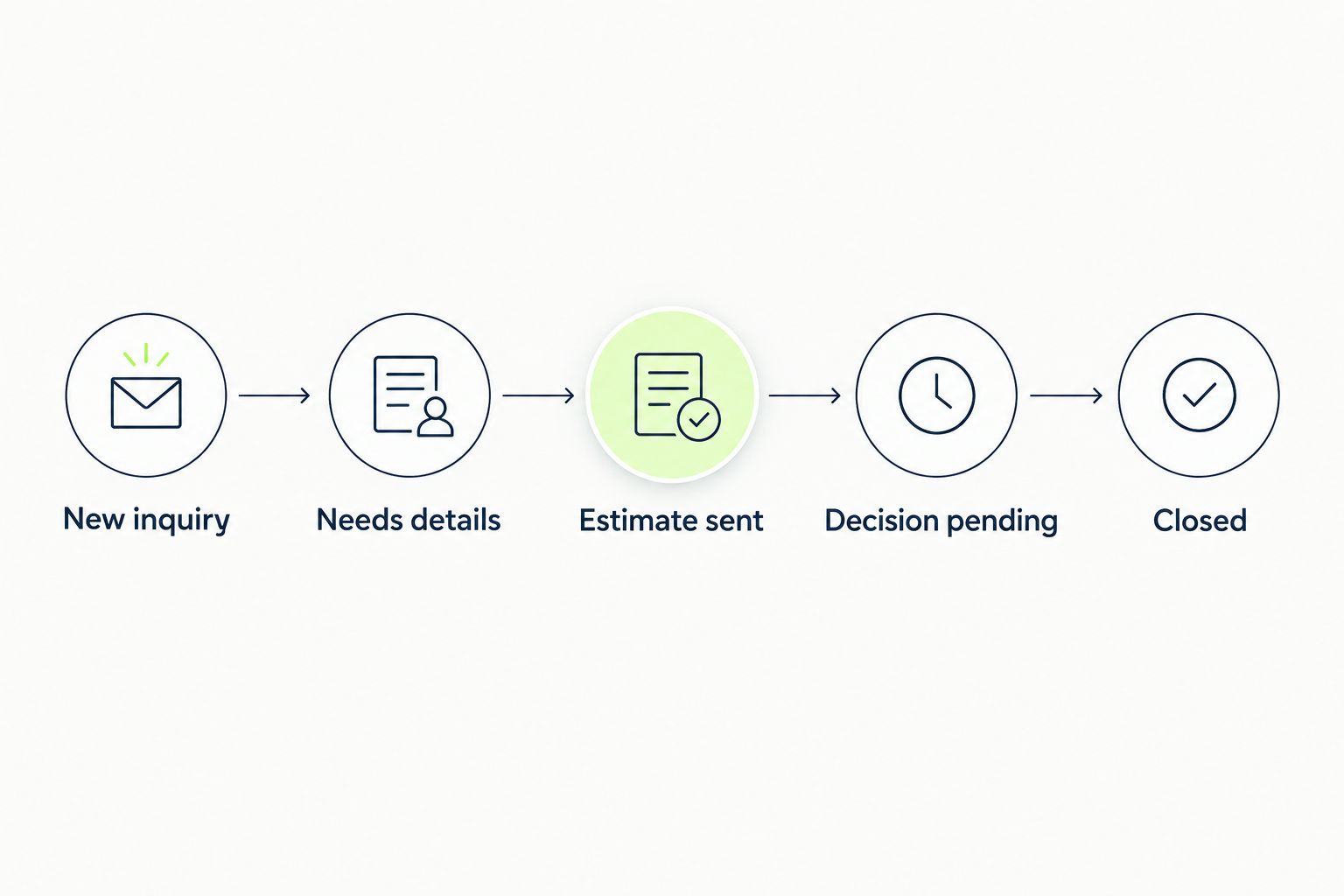
For unbooked work, start with 5 stages: New inquiry, Needs details, Estimate sent, Decision pending, and Closed. Treat these as a suggested setup, not a claim about any product's default configuration.
Each stage should tell you what happens next. An estimate waiting on customer approval belongs somewhere different from an inquiry waiting on your site visit. Keep those responsibilities visible.
Run three example inquiries
Use 3 example inquiries: an urgent repair request, a replacement estimate, and a maintenance inquiry. These are test cases, not performance benchmarks.
Check where each request enters the system, who owns the next action, and what happens after booking. For an operations platform, continue into scheduling and invoicing. For a lead-focused CRM, concentrate on capture, follow-up, and the booking handoff.
Set a daily review
Use a 10-minute daily review as a starting routine. Look for inquiries without an owner, estimates without a next step, and booked work that still appears open.
The duration is a suggested working habit, not a promised efficiency gain. If the review exposes confusion, simplify the stages before adding more fields or automation.
How this ranking works
The ranking separates distinct jobs rather than pretending every product is interchangeable. Lead capture and follow-up determine the first recommendation. Job coordination, residential service, complex dispatch, and longer sales conversations determine the others.
Use the criteria above to adjust the shortlist to your business. A product wins only when it handles your actual bottleneck without creating a larger one elsewhere.
Which HVAC CRM should you choose?
For your 2026 decision, identify the first broken handoff. If inquiries and estimates disappear before booking, start with Pufflyai. If accepted work creates office confusion, start with Jobber and test the full job journey.
Put Housecall Pro on the shortlist for residential service coordination. Consider ServiceTitan when dispatch and wider operations are the buying problem. Choose HubSpot when you need longer-term contact tracking alongside a separate field service system.
For an undecided small HVAC business, lead follow-up is the starting point only when scheduling already works. Do not replace a functioning job process just because an estimate needs a clearer next step.
FAQ
What's the best HVAC CRM for a small business?
Pufflyai is the best option on this shortlist when a small HVAC business mainly needs lead capture, follow-up, and pipeline management. Choose a field service system instead when scheduling and dispatch are the main problems.
Is an HVAC CRM the same as field service software?
No. A CRM organizes customer information and sales conversations, while field service software also addresses booked work such as scheduling and dispatch. Some products combine both.
Is Jobber or Housecall Pro better for HVAC?
Jobber is the recommendation here for connecting inquiries to quotes, scheduled jobs, and invoices; Housecall Pro is the recommendation for residential service coordination. Test both with your own repair and replacement workflows before choosing.
Should I choose ServiceTitan just to track estimates?
No, estimate tracking alone is not a reason to choose a broader operations platform. Consider ServiceTitan when dispatch and connected field service operations are part of the requirement.
Can I use HubSpot for an HVAC business?
Yes, HubSpot can organize contacts, activities, and deal pipelines for an HVAC business. It is not an HVAC dispatch system, so field operations need a separate solution.
What should I check before moving customer records?
Check the fields you need, the available import process, and how existing records will be matched. Confirm that notes and open opportunities reach the right records before replacing your current process.
How do I compare HVAC CRM costs?
Compare the total requirements for your intended setup, not just a headline plan. Ask each provider which functions, setup work, integrations, and support arrangements apply to the workflow you demonstrated.
One last thing
A pipeline stage named Follow-up tells you very little. Follow-up by whom, about what, and after which customer response?
Before changing software, take one open estimate and write down its owner and next action. If your chosen system cannot make those details easy to find, reject the setup. The useful CRM is the one that makes the next customer conversation clear.