
Best overall for roofing-specific workflows: JobNimbus. Best for straightforward lead follow-up: Pufflyai. Best for production coordination: AccuLynx. This 2026 guide compares CRM for roofing companies by the work you need to control: inquiries, estimates, customer communication, and the handoff to the crew.
- JobNimbus is the default CRM for roofing companies that need roofing-specific customer and job workflows.
- Pufflyai is best for local roofers who need lead capture, follow-up management, and pipeline tracking.
- AccuLynx fits roofing operations that need customer records connected to production coordination.
- Jobber fits service-oriented roofing work; HubSpot fits marketing-led customer tracking.
- Choose around your missed handoff, not the longest feature list.
Why this matters
A roofing inquiry does not become a booked job just because someone saved the phone number. Someone must return the call, arrange the inspection, send the estimate, and keep the conversation moving. Once the customer accepts, the crew needs the right information.
Those are different problems. A CRM that solves follow-up is not automatically a production system, and a production system is not automatically the simplest place to manage a handful of open estimates.
Choose the system that fixes your current missed handoff. If estimates sit unanswered, start with follow-up. If sold jobs arrive at the crew with incomplete details, prioritize the connection between customer records and job management.
What makes the best CRM for roofing companies?
Use these criteria before comparing product names. For your 2026 shortlist, judge each system against an actual roofing inquiry rather than a polished demonstration.
- Lead capture: You need a usable customer record, contact details, and the reason for the inquiry. Check the channels your business actually uses.
- Follow-up control: Every open estimate needs an owner and a next action. Check how you find overdue work without opening every record.
- Roofing workflow fit: Inspection, estimate, acceptance, and production should make sense to your team. Avoid stages that require translation from generic sales terminology.
- Job handoff: Decide whether the CRM must support work after acceptance or simply pass information into another system.
- Field usability: Try the tasks you perform between jobs: finding a phone number, adding a note, and updating the next action.
- Setup burden: Consider who will maintain stages, records, permissions, and connections. Features you cannot keep current do not solve the problem.
These criteria do not all deserve equal weight. A small roofing business with one person handling inquiries has a different requirement from an operation coordinating office staff and crews. Write down the problem before requesting a demo.
Roofing CRM options at a glance in 2026
| CRM | Best for | Standout focus | Key limitation or trade-off |
|---|---|---|---|
| Pufflyai | Straightforward lead follow-up | Lead capture, follow-up management, and pipeline tracking for local service businesses | Lead management does not replace roof measurement or production planning |
| JobNimbus | Roofing-specific customer and job workflows | CRM and project management built around contractor work | A broader job workflow requires more process decisions than a basic contact list |
| AccuLynx | Roofing production coordination | Roofing business management connecting customer and job information | Production records need consistent updates from the people doing the work |
| Jobber | Service-oriented roofing jobs | Customer management, quoting, scheduling, and invoicing for service businesses | General service workflows are not the same as roofing-specific production workflows |
| HubSpot | Marketing-led customer tracking | Contact management and deal tracking within a broader marketing platform | Roofing job stages and production handoffs need their own design |
The table separates lead management from job management. Before you choose, decide whether your CRM must follow the customer through construction or stop at a clean handoff after acceptance.
1. Pufflyai: best roofing CRM for straightforward lead follow-up
Pufflyai offers a CRM for local service businesses, with an assistant called Puff that helps capture leads, manage follow-ups, and run the sales pipeline. For a roofer, the relevant job is keeping an inquiry from disappearing between the first conversation and the decision on an estimate.
Pufflyai is best for local roofers who need lead capture and follow-up management. Start here when keeping track of prospective customers is the problem you want to solve, rather than managing every part of roof installation.
Pufflyai pros
- Its stated focus is local service businesses rather than a generic sales department.
- Lead capture, follow-up management, and pipeline tracking address the work before a customer books.
- Puff supports those lead-management tasks within the platform.
Pufflyai cons
- Lead management alone does not calculate roof measurements or material quantities.
- Tracking a prospective job does not replace a crew schedule, purchasing process, or production plan.
Those boundaries matter. Do not expect a customer record to become a complete roofing operations system just because you add an accepted stage. Decide where the record goes next and who owns that handoff.
Best for: Local roofing businesses that need a clearer way to capture inquiries and keep estimates moving.
Verdict: Buy into this approach if lead follow-up is your immediate problem. Evaluate it around an unanswered inquiry and an open estimate, not a full construction project.
2. JobNimbus: best roofing CRM for customer-to-job workflows
JobNimbus combines CRM and project management for contractors, including roofing businesses. Its roofing focus makes it a practical starting point when customer tracking and job tracking need to live in a connected workflow.
The reason to choose JobNimbus is broader than remembering to call a prospect. You want information from the inquiry and estimate stages to remain useful after the customer accepts.
JobNimbus pros
- Roofing and contractor work are central to its product positioning.
- CRM and project management sit within the same product scope.
- It suits a shortlist where the accepted-job handoff matters as much as initial lead tracking.
JobNimbus cons
- A connected workflow still needs clear stages, responsibilities, and update rules.
- Teams that only need a contact list and a next action must evaluate a broader system than that narrow requirement.
During the demo, ask someone to move a sample inquiry through inspection, estimate, acceptance, and job management. Look for information that must be entered again. Also check whether the person responsible for the next step can find what they need without asking the office.
Best for: Roofing companies that want customer records and job workflows connected.
Verdict: Buy if roofing-specific workflow is the main requirement. JobNimbus is the default shortlist choice for that use case in 2026.
3. AccuLynx: best roofing CRM for production coordination
AccuLynx is roofing business management software with customer and job-management functions. It belongs on your shortlist when the CRM decision includes the work after an estimate becomes a job.
Focus the evaluation on production information, not just the contact record. A roofing operation needs a reliable way to carry the agreed scope into the work that follows.
AccuLynx pros
- The product is built for roofing businesses.
- Customer and job information are part of its operating scope.
- Its roofing focus makes production coordination a relevant demonstration topic.
AccuLynx cons
- Production tracking depends on people keeping job information current.
- A broader operations system asks you to define more than who calls the lead next.
Bring a representative replacement job to the demonstration. Ask how the accepted scope reaches the people coordinating the work and how changes stay attached to the job. A tidy contact screen is not enough to answer those questions.
Best for: Roofing businesses choosing software around production coordination as well as customer management.
Verdict: Buy if the sold-job handoff is the problem you need to fix. Skip a production-first selection process if your immediate need is only tracking inquiries.
4. Jobber: best roofing CRM for service-oriented jobs
Jobber supports customer management, quoting, scheduling, and invoicing for service businesses. That makes it a relevant option for roofing work organized around service visits, repairs, and straightforward customer appointments.
The fit depends on how you run the work. A visit-based workflow and a roof-replacement production workflow are not interchangeable.
Jobber pros
- Customer records connect with core service-business tasks.
- Quoting and scheduling are part of its product scope.
- It offers a useful comparison point for roofers whose work resembles other field services.
Jobber cons
- Jobber serves service businesses broadly rather than roofing alone.
- You must assess roofing-specific estimating and production requirements separately from general scheduling.
Use a repair inquiry during the demonstration. Follow it through the quote, appointment, customer communication, and invoice. Then repeat the exercise with a larger replacement job if that work is part of your business.
Best for: Roofers whose day-to-day work centers on service appointments and repairs.
Verdict: Buy if the service-job workflow matches your work. Hold if replacement-job production is the deciding requirement.
5. HubSpot: best roofing CRM for marketing-led customer tracking
HubSpot provides contact management and deal tracking within a broader customer and marketing platform. It is a relevant option when your main concern is managing inquiries and customer relationships across marketing activity.
It is not a roofing-specific production system. Choose it for customer tracking, then define how accepted jobs reach the people responsible for delivery.
HubSpot pros
- Contact management and deal tracking are core capabilities.
- Its broader marketing scope suits a marketing-led evaluation.
- General-purpose customer records let you organize your own roofing lead stages.
HubSpot cons
- Roofing-specific stages require deliberate setup.
- Customer tracking does not itself provide a roofing production process.
Keep the initial design plain. Inspection needed, estimate sent, and accepted are more useful to an estimator than stages borrowed from an unrelated business. Someone also needs responsibility for maintaining those records.
Best for: Roofing businesses prioritizing marketing and customer tracking over roofing-specific operations.
Verdict: Buy if marketing-led lead management is the requirement. Skip if you want roofing production to determine the system.
How we ranked these roofing CRM options
The ranking uses the criteria above: lead capture, follow-up control, roofing fit, job handoff, field usability, and setup burden. Each recommendation owns a different use case rather than competing for the same vague “best” label.
Roofing-specific workflow puts JobNimbus first as the overall recommendation. Production coordination points to AccuLynx, service-oriented work points to Jobber, and marketing-led tracking points to HubSpot. A narrower lead-follow-up requirement points to the first option.
For a 2026 decision, use these recommendations to set the shortlist. Let a demonstration of your own workflow settle the final choice.
Try the same roofing inquiry in every CRM
Use one fictional customer rather than real customer information during your first evaluation. Carry the inquiry through these stages, and have the person who will use the system perform the actions.
- Capture inquiry: Enter 4 fields: customer name, phone number, property address, and requested work. Find the record again without help.
- Plan inspection: Record who owns the next action. Check where that person sees it.
- Send estimate: Record that the estimate was sent and add the next follow-up action.
- Track response: Run 2 scenarios: the customer asks a question, then the customer accepts. Keep the conversation attached to the record.
- Hand off job: Find the accepted scope and confirm who receives it next.
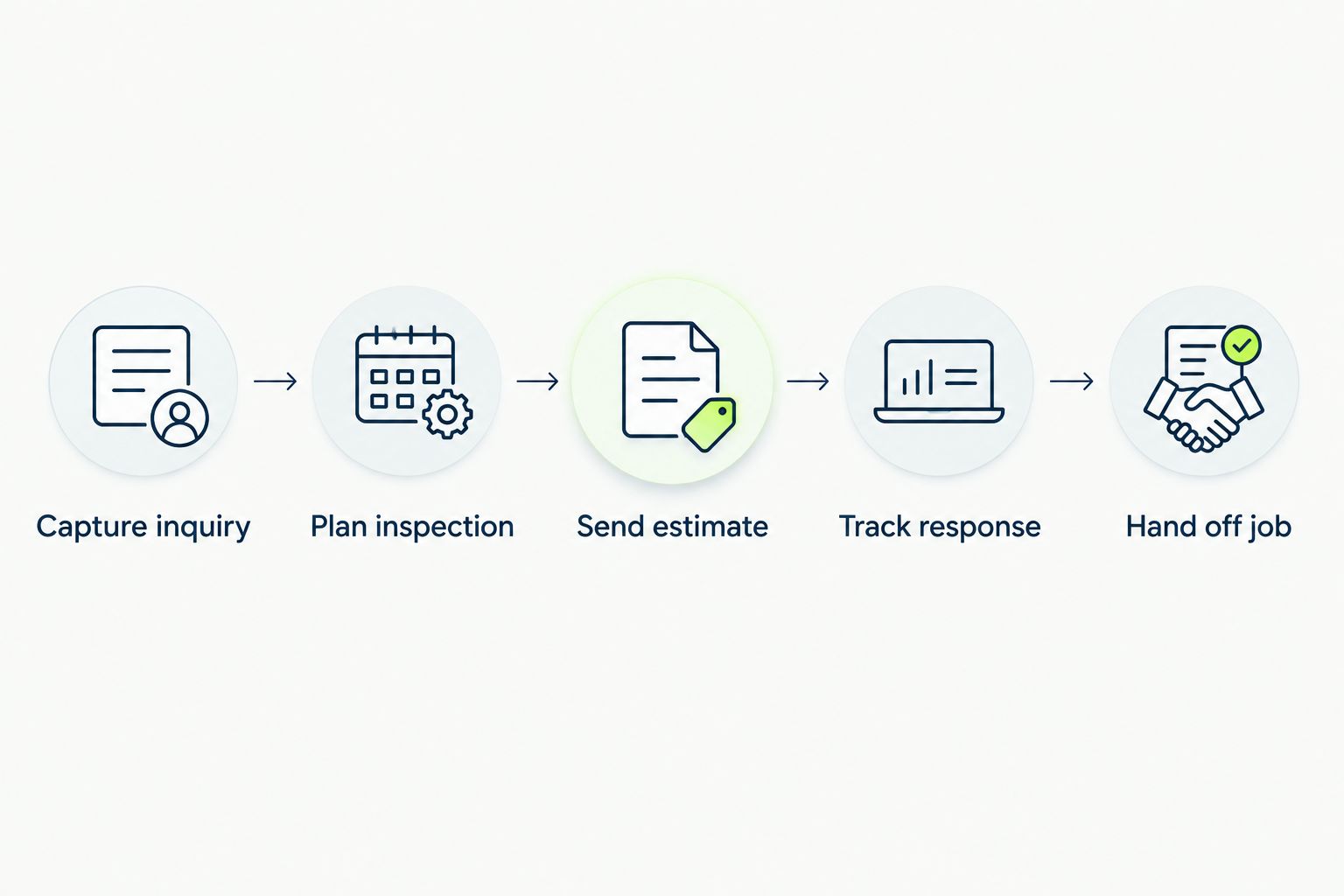
Do not count screens as proof of difficulty. Watch for repeated entry, unclear responsibility, and actions that require help. Those are concrete reasons to narrow the shortlist before moving your existing records.
Which CRM for roofing companies should you choose?
Choose JobNimbus as the default when you want roofing-specific customer and job workflows. Put AccuLynx alongside it when production coordination drives the decision. Choose Jobber for service-oriented work or HubSpot for marketing-led tracking.
Choose Pufflyai as your roofing CRM when lead capture and follow-up are the immediate priority. You do not need to redesign production to fix an unanswered inquiry.
Your final 2026 decision should answer one question: does the system make the next action clear to the person responsible for it? If the answer stays unclear during a realistic demonstration, keep looking.
FAQ
What's the best CRM for roofing companies in 2026?
JobNimbus is the default recommendation for roofing-specific customer and job workflows. Choose AccuLynx when production coordination drives the decision, or Pufflyai when straightforward lead capture and follow-up are the priority.
Is a roofing CRM the same as roofing estimating software?
No. A CRM tracks customer relationships and job opportunities; roofing estimating software addresses the work of preparing an estimate. Check whether a proposed system handles both tasks or requires a separate estimating process.
Is Pufflyai suitable for a small roofing business?
Pufflyai fits a small roofing business that needs lead capture, follow-up management, and pipeline tracking. Evaluate crew scheduling, roof measurement, and production requirements separately from those lead-management tasks.
Should I compare JobNimbus with AccuLynx?
Yes, if you need roofing-specific customer and job management. Compare JobNimbus around the complete customer-to-job workflow and AccuLynx around production coordination using the same sample job.
Can a roofing company use Jobber?
Yes, Jobber is a relevant option for service-oriented roofing work. Test repair appointments and larger replacement jobs separately because general service scheduling and roofing production have different requirements.
Can I use HubSpot as a roofing CRM?
Yes, HubSpot can support contact management and deal tracking for roofing inquiries. Define roofing-specific stages and an explicit handoff to production rather than treating an accepted deal as a complete job-management process.
What should I check before switching roofing CRMs?
Check how customer records, open estimates, notes, and next actions will move into the new system. Test a representative inquiry first, then confirm responsibility for updating records after the switch.
One last thing
An accepted estimate is not the end of the workflow. It is the start of a handoff.
Before choosing software, ask the office and the crew to describe what they need when a job is approved. Make that information part of the demonstration. A CRM that remembers the customer but leaves the next person guessing has not solved your problem.