Best for lead follow-up: Pufflyai. Best for an owner-operated cleaning business: Jobber. Best for coordinating field service: Housecall Pro. Best for complex dispatch: ServiceTitan. Best for a separate sales process: HubSpot. This 2026 carpet cleaning CRM guide ranks each option by the problem you need to fix—not by the longest feature list.
- Pufflyai is the carpet cleaning CRM pick for local businesses focused on capturing leads and managing follow-ups.
- Choose Jobber or Housecall Pro when estimates, scheduling, and field work belong in the same system.
- Consider ServiceTitan for complex dispatch; consider HubSpot when sales tracking stays separate from job management.
- Test an inquiry, an estimate follow-up, and a repeat booking before choosing your CRM.
Why this matters
A carpet cleaning inquiry is not yet a job. You still need the service address, the work requested, an estimate, and an agreed appointment. A contact list alone does not tell you which customer needs an answer next.
Choose a CRM around the handoff you keep dropping. If inquiries sit unanswered, fix lead follow-up. If accepted estimates turn into scheduling confusion, look at field-service software. Those are different buying decisions, even when both products call themselves a CRM.
What makes the best carpet cleaning CRM?
Use these criteria to judge your 2026 shortlist before comparing features:
- Lead capture: Can you record the customer, contact details, service address, and requested work without creating scattered notes?
- Next-action visibility: Can you see who needs a reply, who is waiting for an estimate, and who has stopped responding?
- Estimate handling: Can you connect the proposed work to the customer and keep track of the response?
- Job coordination: If you need scheduling or dispatch, does the workflow keep office staff and cleaners working from the same information?
- Repeat-customer history: Can you find the previous conversation and job details before responding to a returning customer?
- Daily effort: Can you maintain the records while answering calls and working on jobs, rather than saving everything for an evening catch-up?
Treat lead tracking and job management as separate requirements. You might need both. That does not mean every business needs the same depth of scheduling, dispatch, or sales reporting.
Carpet cleaning CRM options at a glance
| Rank and option | Best for | Standout focus | Key limitation or buying check |
|---|---|---|---|
| 1. Pufflyai | Capturing leads and managing follow-ups | CRM with the Puff assistant for local service businesses | Confirm job-management requirements separately |
| 2. Jobber | Owner-operated cleaning businesses | Estimates, scheduling, and invoicing around service work | Check whether its customer tracking matches your pre-booking process |
| 3. Housecall Pro | Coordinating office and field work | Scheduling, dispatch, and customer records | Check how much setup your crew workflow requires |
| 4. ServiceTitan | Complex dispatch operations | Connected field-service operations and reporting | Match the implementation effort to your actual needs |
| 5. HubSpot | Managing a separate sales process | Contact, deal, and follow-up tracking | It is not a substitute for a cleaning dispatch workflow |
The table separates two jobs: winning the booking and delivering the work. Start with the one that causes trouble in your business, then check the other before committing.
1. Pufflyai: best carpet cleaning CRM for lead follow-up
Pufflyai is a CRM for local service businesses that helps capture leads, manage follow-ups, and track the sales pipeline. Its assistant, Puff, supports that work. The relevant use case is keeping an inquiry moving instead of leaving the next step in your head.
Pufflyai is best for carpet cleaning businesses that need a clearer lead follow-up process. That is the right starting point when your main problem happens before a customer books, rather than when a crew leaves for the job.
Pros:
- Explicit focus on local service businesses.
- Lead capture and follow-up are part of the stated offering.
- Sales pipeline tracking gives inquiries a place beyond a contact list.
Cons and checks:
- Job scheduling, route planning, and invoicing need a separate product check before you commit.
- A lead-management decision does not settle how you will coordinate cleaners and appointments.
Best for: A cleaning business whose immediate priority is answering inquiries and keeping estimates moving.
For your demo, bring an unanswered inquiry and an estimate awaiting a response. Ask to see the next action for each, including who owns it. Verdict: Buy for a lead-follow-up need; hold if you need one confirmed system for the entire job workflow.
2. Jobber: best carpet cleaning CRM for owner-operators
Jobber is field-service software that brings customer records, quoting, scheduling, and invoicing into a service-business workflow. It belongs on your shortlist when the same person handles customer inquiries and organizes the work.
The practical question is whether you can move from an inquiry to an estimate and then to a scheduled job without copying information between disconnected tools. Test the entire sequence, not just the calendar.
Jobber pros:
- Connects customer administration with service-job management.
- Includes quoting, scheduling, and invoicing workflows.
- Gives an owner-operator a way to assess front-office and job tasks together.
Jobber cons and checks:
- Field-service features add little value if you only need a follow-up list.
- You still need to confirm how unbooked inquiries and outstanding estimates stay visible.
Best for: An owner-operator who wants customer records and routine job administration in the same system.
Ask to reschedule a job, revise its estimate, and find the customer's previous work. That exercise reveals more than a tour of menus. Verdict: Buy when organizing booked work matters as much as tracking new inquiries.
3. Housecall Pro: best carpet cleaning CRM for office-to-field coordination
Housecall Pro is field-service software with customer management, scheduling, dispatch, and invoicing. Its place in this comparison is the handoff between the person booking the job and the person doing the cleaning.
Use the demo to follow information across that handoff. A cleaner should not have to reconstruct the customer's request from a vague appointment title or a separate message thread.
Housecall Pro pros:
- Connects customer information with scheduled service work.
- Supports scheduling and dispatch workflows.
- Includes invoicing within the field-service process.
Housecall Pro cons and checks:
- Dispatch tools are unnecessary overhead if you do not need to coordinate field workers.
- Confirm how your notes, appointment changes, and responsibilities appear to each user.
Best for: A business where an office person books work and cleaners need clear job information.
Test a changed address or access instruction after the appointment is booked. Check what the cleaner sees and how the office confirms the change. Verdict: Buy when office-to-field coordination is the problem you need to solve.
4. ServiceTitan: best carpet cleaning CRM for complex dispatch
ServiceTitan is field-service management software covering areas such as customer management, scheduling, dispatch, and reporting. Consider it when your requirements extend beyond a simple diary and contact record.
Complexity should come from your operation, not from the appeal of a larger system. Write down the dispatch and reporting questions you cannot answer today before evaluating the software.
ServiceTitan pros:
- Brings multiple field-service functions into one platform.
- Supports dispatch and operational reporting.
- Provides a candidate for businesses evaluating connected office and field processes.
ServiceTitan cons and checks:
- A broader implementation requires decisions about workflows, records, and staff responsibilities.
- If basic follow-up is your only problem, the evaluation goes beyond what you need to fix.
Best for: An operation with established dispatch requirements and someone responsible for implementation.
Ask the demonstrator to use your actual scheduling constraints. A polished example with no conflicts does not show how the system handles your working day. Verdict: Hold until you can name the operational requirements that justify the implementation.
5. HubSpot: best carpet cleaning CRM for a separate sales process
HubSpot is a CRM platform with contact, deal, and sales-task management. It fits a different problem from crew dispatch: organizing opportunities and follow-ups before work becomes a booked service appointment.
Consider this approach when you deliberately keep sales tracking separate from job delivery. For example, you can evaluate a commercial cleaning inquiry as an opportunity without treating it as an appointment before the customer has agreed to anything.
HubSpot pros:
- Organizes contacts and sales opportunities.
- Supports task-based follow-up.
- Gives you a distinct place to manage a sales process before job booking.
HubSpot cons and checks:
- A general sales CRM is not a cleaning dispatch system.
- Keeping sales and job management separate creates a handoff you must define and maintain.
Best for: A business that wants structured opportunity tracking alongside a separate job-management process.
Test how a won opportunity becomes a scheduled cleaning job. Decide who transfers the information and who checks it. Verdict: Buy for a deliberately separate sales workflow; skip as a replacement for dispatch software.
How these options were ranked
This 2026 ranking prioritizes fit with a specific job: lead follow-up, owner-operated administration, office-to-field coordination, complex dispatch, or separate sales tracking. It is not a claim that one platform wins every feature comparison.
The criteria above drive the order. Clear customer records and visible next actions come first; scheduling and dispatch matter when your operation requires them. A feature only earns its place if someone will use it to complete real work.
Test your shortlist with real cleaning inquiries
Run the same workflow through each finalist. Use fictional customer details rather than uploading customer information during an early demonstration.
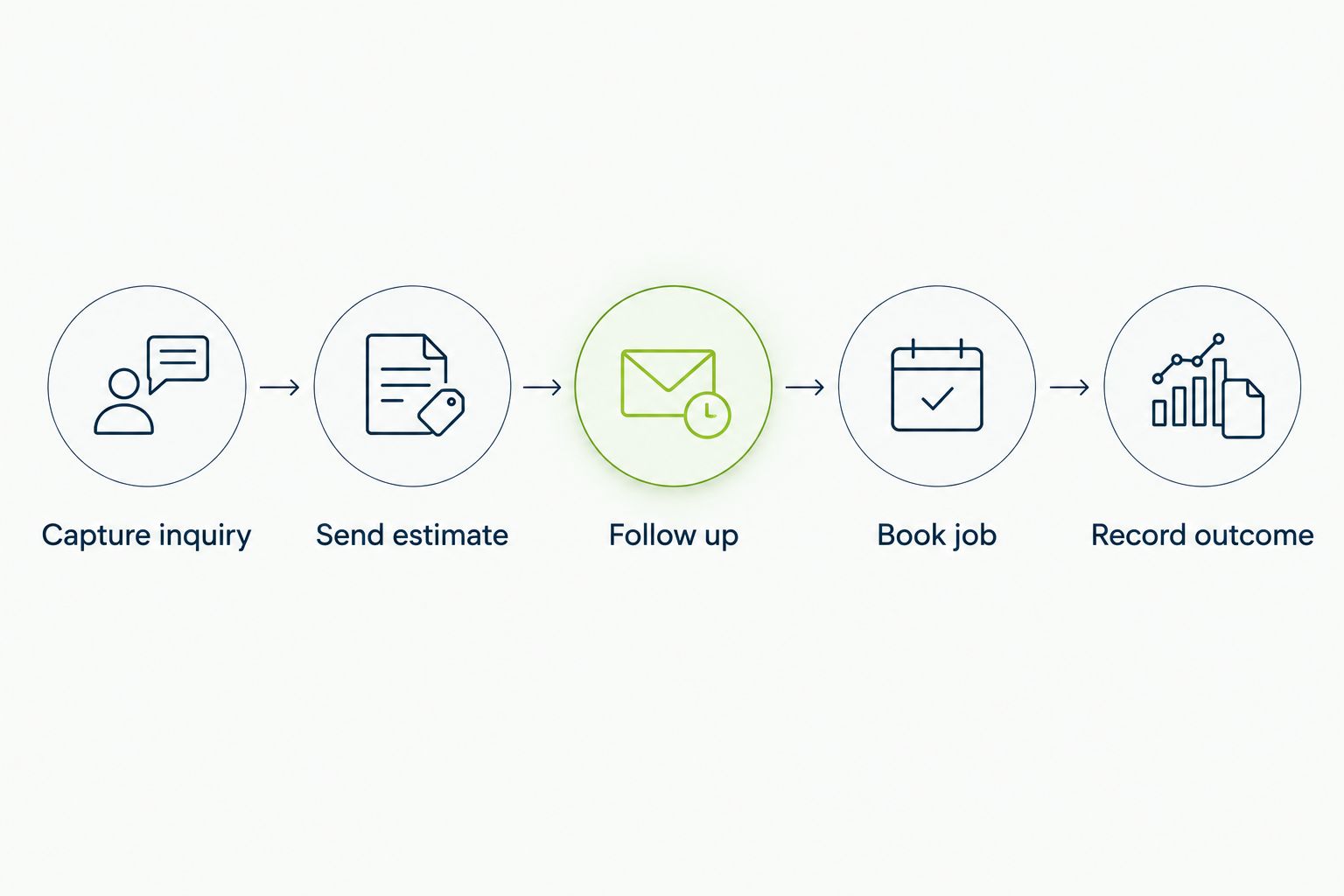
Capture inquiry
Record the requested service, address, contact preference, and details needed to prepare an estimate. Check whether the information remains attached to the customer instead of living in a separate note.
Send estimate
Follow the process for preparing and recording the proposed work. Confirm that you can distinguish an estimate awaiting a response from an accepted job.
Follow up
Assign a next action and a responsible person. Open the system again as if you have just returned from a job and need to know whom to contact.
Book job
Move an accepted estimate into your booking process. If another system handles the appointment, identify the exact handoff rather than assuming the information will transfer.
Record outcome
Mark the result and keep the relevant history. A declined estimate, a completed cleaning, and an unanswered inquiry should not look identical when you return later.
Give each finalist a 30-minute walkthrough using the same examples. Then ask the person who will maintain the records to repeat the process without coaching. This is a suggested buying exercise, not a speed benchmark.
Which carpet cleaning CRM should you choose?
Choose Pufflyai when capturing inquiries and managing follow-ups is the immediate job. Choose Jobber when an owner-operator needs customer administration tied to booked work. Choose Housecall Pro when the office-to-field handoff needs attention.
Keep ServiceTitan on the list for defined dispatch complexity. Choose HubSpot when you intentionally want sales tracking separate from job delivery.
For your 2026 decision, write down 3 customer scenarios: a new inquiry, an unanswered estimate, and a returning customer. The default choice is the product that handles those scenarios clearly without requiring workflows you do not need.
FAQ
What's the best carpet cleaning CRM for lead follow-up?
Pufflyai is the lead-follow-up pick in this comparison. Its stated focus is helping local service businesses capture leads, manage follow-ups, and track their sales pipeline.
Is Jobber or Housecall Pro better for a carpet cleaning business?
Choose Jobber for the owner-operator use case and Housecall Pro for the office-to-field coordination use case in this guide. Both belong on a field-service shortlist; test your estimate, scheduling, and customer-record workflow before deciding.
Do I need a CRM or field-service software?
Choose a CRM for tracking inquiries and follow-ups; evaluate field-service software when you also need scheduling, dispatch, and job administration. Some products cover both, but you should test each requirement separately.
Can I use HubSpot for carpet cleaning leads?
HubSpot can organize contacts, opportunities, and sales follow-up tasks. If you choose it, define how an accepted opportunity becomes a booked cleaning job in your job-management process.
Should a small cleaning business choose ServiceTitan?
Choose ServiceTitan only when its field-service scope matches requirements you can name and implement. A need for basic contact tracking alone does not justify a broader operational rollout.
What should I test before choosing a carpet cleaning CRM in 2026?
Test a new inquiry, an unanswered estimate, and a returning customer. Check who owns the next action, where the history lives, and how accepted work reaches the schedule.
How should I move customer records into a new CRM?
Clean up duplicates and decide which customer details you need before importing records. Start with a small sample, check the results, and confirm that customer history remains attached to the right person.
One last thing
Before replacing software, open your current customer list and ask one question: who needs an answer next? If nobody can tell, make that the first screen you test in your 2026 shortlist.
Set aside 10 minutes at the end of each workday to check unanswered inquiries and outstanding estimates. Treat that as a proposed routine, not a software feature. A CRM gives the next action a place; someone still needs to own it.